
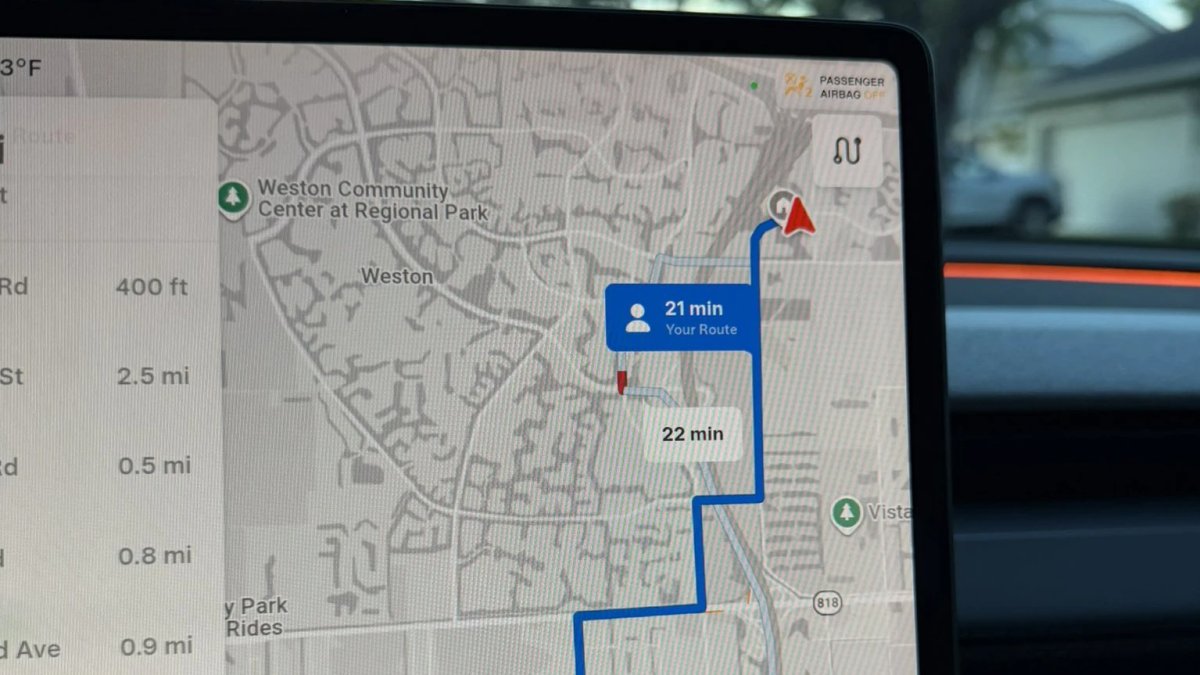

La mise à jour d'été de Tesla apporte cette année plusieurs nouvelles fonctionnalités, notamment les commandes vocales Grok (vidéo), le zoom sur la visualisation de conduite, le karaoké style « Rock Band » et, surtout, des itinéraires de navigation personnalisés.
Bien que les itinéraires privilégiés aient été présentés dans le cadre de la mise à jour d'été, vous n'avez pas besoin de la mise à jour logicielle 2026.26 pour commencer à utiliser le routage personnalisé.
Itinéraires privilégiés
Avec les itinéraires privilégiés, le véhicule enregistre les trajets que vous effectuez le plus fréquemment vers chaque destination, puis prend en compte votre chemin habituel aux côtés des autres options. Si le temps de trajet de votre itinéraire est raisonnablement proche de celui de l'option la plus rapide, le véhicule sélectionnera votre trajet privilégié.
Cette fonctionnalité s'appuie sur la capacité d'itinéraires alternatifs de Tesla, qui apparaît au début d'un trajet (vous pouvez également afficher les alternatives à tout moment en appuyant sur « Prochaine étape » en haut de la liste des directions). Les itinéraires alternatifs sont arrivés en 2022, proposant jusqu'à trois trajets suggérés vers votre destination. Avec cette mise à jour, une fois que le véhicule a collecté suffisamment de données, « Votre itinéraire » devient l'un des choix proposés.


Nécessite une mise à jour des cartes
Bien que la fonctionnalité d'itinéraires privilégiés soit mise en avant dans la version d'été, de nombreux propriétaires la voient apparaître avec la dernière mise à jour des cartes. Tesla a commencé à déployer la mise à jour cartographique 2026.26 en Amérique du Nord la semaine dernière et, comme pour les mises à jour logicielles, le déploiement est progressif.
Les cartes s'installent silencieusement en arrière-plan, vous ne recevrez donc pas de notification. Pour vérifier manuellement, allez dans Contrôles > Logiciel et faites défiler jusqu'à Données de navigation.
Qui peut en bénéficier
Pour l'instant, Tesla limite les itinéraires privilégiés aux États-Unis. Même si vous avez reçu la mise à jour cartographique 2026.26, vous devez être aux États-Unis pour voir vos itinéraires personnalisés.
Si votre véhicule dispose déjà des cartes 2026.26, vous devriez commencer à voir apparaître vos itinéraires personnalisés après avoir navigué vers la même destination à quelques reprises.
Tesla précise que le routage en ligne doit être activé pour voir les itinéraires privilégiés ; ce paramètre est activé par défaut et ne nécessite pas la Connectivité Premium. Tesla indique également que vos données de localisation sont anonymisées et ne sont pas associées à votre véhicule.
Comment cela fonctionne
Le véhicule suit probablement en local les virages que vous prenez pour vous rendre à un endroit donné et la fréquence à laquelle vous suivez exactement ce chemin. Lorsque vous sélectionnez une destination, la voiture envoie probablement votre itinéraire le plus utilisé pour cette destination à Tesla. Tesla répond ensuite avec les meilleurs itinéraires vers cette destination, en incluant le temps de trajet pour votre itinéraire le plus fréquenté.
Bien que Tesla utilise de nombreux éléments liés aux cartes provenant de Google — tels que les tuiles de carte, l'imagerie satellite, les points d'intérêt et les données de trafic — l'application de navigation elle-même est conçue par Tesla. Tesla calcule également ses propres itinéraires vers chaque destination au lieu de s'appuyer sur Google, ce qui permet d'activer des fonctionnalités comme les itinéraires privilégiés et de prendre en compte la recharge via Superchargeur.
Cette fonctionnalité est disponible sur tous les modèles Tesla équipés d'unités d'infodivertissement Intel ou AMD. Vous la reconnaîtrez lorsque « Votre itinéraire » apparaîtra comme étiquette parmi les itinéraires alternatifs affichés au début d'un trajet.
















Partager:
Tesla procède au rappel physique de 20 349 véhicules Model 3 et Model Y en raison d'un problème de phares
À quoi pourrait ressembler une Tesla Model 3 restylée