
Cette mise à jour ajoute la version FSD 14.3.5 pour l'Australie et la Nouvelle-Zélande.
FSD (Supervisée) v14.3.5 « Down Under »
La version 14.3.5 de la Conduite entièrement autonome (supervisée) apporte les changements suivants :
- Mise à niveau de l'étape d'apprentissage par renforcement (RL) de l'entraînement du réseau neuronal FSD, ce qui permet d'améliorer un large éventail de scénarios de conduite.
- Mise à niveau de l'encodeur de vision du réseau neuronal, améliorant la compréhension des scénarios rares et à faible visibilité, renforçant la compréhension de la géométrie 3D et élargissant la reconnaissance des panneaux de signalisation.
- Réécriture complète du compilateur IA et de l'exécution avec MLIR, permettant un temps de réaction 20 % plus rapide et améliorant la vitesse d'itération des modèles.
- Atténuation des biais de voie inutiles et des comportements mineurs de suivi de trop près.
- Augmentation de la détermination lors de la sélection et des manœuvres de stationnement.
- Amélioration de la prédiction des épingles d'emplacement de stationnement, désormais affichées sur une carte avec une icône P.
- Réponse améliorée aux véhicules d'urgence, aux bus scolaires, aux contrevenants aux règles de priorité et aux autres véhicules rares.
- Gestion améliorée des petits animaux en concentrant l'entraînement RL sur des exemples plus difficiles et en ajoutant des récompenses pour une meilleure sécurité proactive.
- Amélioration de la gestion des feux de circulation aux intersections complexes avec des feux multiples, des routes courbes et des arrêts aux feux jaunes, grâce à l'entraînement sur des exemples RL difficiles provenant de la flotte Tesla.
- Gestion améliorée des objets rares et inhabituels dépassant, suspendus ou empiétant sur la trajectoire du véhicule en recherchant les événements peu fréquents au sein de la flotte.
- Gestion améliorée des dégradations temporaires du système en conservant le contrôle et en récupérant automatiquement sans intervention du conducteur, réduisant ainsi les désengagements inutiles.
- Amélioration de la sensibilité du système de surveillance du conducteur avec un meilleur suivi du regard, une meilleure gestion du port de lunettes et une plus grande précision dans des conditions d'éclairage variables.
- Vous pouvez aider à améliorer la Conduite autonome en sélectionnant une raison d'intervention sur l'écran principal après avoir repris le contrôle.
- Vous pouvez désormais voir la distance parcourue en mode FSD (Supervisée) sans intervention. L'application Conduite autonome affichera également votre plus longue série sans intervention.
- Les options de stationnement s'affichent désormais sur la carte à votre arrivée à destination.
Améliorations à venir
- Étendre le raisonnement à tous les comportements au-delà de la gestion de la destination.
- Ajouter l'évitement des nids-de-poule.
Sièges de sécurité pour enfants à la deuxième rangée
Consultez votre manuel du propriétaire pour obtenir des conseils supplémentaires sur l'installation des sièges de sécurité pour enfants à la deuxième rangée.
Options d'arrivée
- Vous pouvez désormais sélectionner une option d'arrivée telle que Parking, Parking couvert, Rue, Allée et Arrêt pour les déposes de type Robotaxi.
- Vos préférences pour les options d'arrivée et les positions de stationnement privilégiées sont conservées pour chaque destination.
- Le modèle de raisonnement évaluera les options appropriées pour votre destination et choisira une valeur par défaut intuitive.
- L'épingle de navigation s'ajustera en fonction de l'option d'arrivée sélectionnée.
Profils de vitesse
Le mode FSD (Supervisée) déterminera désormais la vitesse appropriée en fonction d'une combinaison du profil du conducteur, de la limite de vitesse et de la circulation environnante.
- Le profil du conducteur a désormais un impact plus important sur le comportement. Plus le profil est affirmé, plus la vitesse maximale est élevée.
- La molette de défilement droite haut/bas ajuste désormais le réglage du profil de vitesse plutôt que votre sélection précise de décalage de vitesse maximale en mi/h ou km/h.
- Introduction du nouveau profil de vitesse PARESSEUX, qui utilise des vitesses plus faibles et une sélection de voie plus conservatrice que le mode DÉTENTE.
Améliorations de l'interface utilisateur
- Vous pouvez désormais consulter vos statistiques de conduite autonome sous Contrôles > Conduite autonome.
- Démarrez la conduite autonome en appuyant sur l'écran tactile depuis le mode Parking, ou à tout moment pendant votre trajet.
- Ajustez les paramètres tels que le profil de vitesse et les options d'arrivée directement depuis la visualisation de la conduite autonome sur l'écran central.
Confirmation par le frein
La confirmation par le frein pour le bouton Démarrer la conduite autonome est désormais désactivée par défaut. Lorsqu'elle est désactivée, le démarrage de la conduite autonome ne nécessite pas d'appuyer sur la pédale de frein pour confirmer l'engagement.
Vous pouvez activer la confirmation par le frein dans Conduite autonome > Confirmation par le frein.
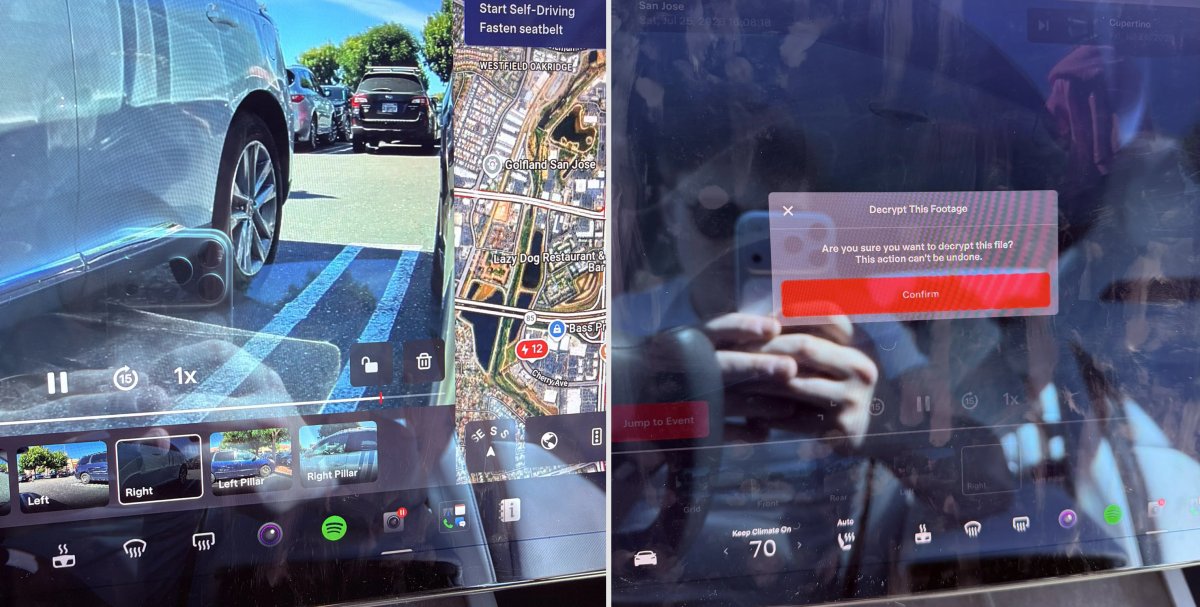
Déchiffrer la vidéo de la Dashcam

Avec la mise à jour 2026.20, Tesla a commencé à chiffrer les séquences de la Dashcam. Cela a coïncidé avec l'augmentation de la durée des séquences vidéo récentes, passant de 1 heure à jusqu'à 24 heures sous certaines conditions.
Le chiffrement des vidéos est un changement important pour la confidentialité, car si votre clé USB est retirée de votre véhicule, des voleurs pourraient désormais accéder jusqu'à 24 heures de vos trajets, révélant potentiellement votre lieu de travail, votre domicile et d'autres emplacements importants.
Cette mise à jour ajoute un bouton à la visionneuse de Dashcam qui permet aux propriétaires de déchiffrer facilement un clip spécifique, facilitant ainsi la visualisation des séquences sur un ordinateur après avoir monté la clé USB.
Tesla a également introduit un outil qui vous permet de déchiffrer des vidéos sur votre ordinateur, à condition de vous connecter à votre compte Tesla pour prouver que vous êtes le propriétaire des séquences vidéo.
Voies de bus

La navigation Tesla prend désormais en charge les voies de bus, aidant les conducteurs à être plus conscients des voies qu'ils peuvent utiliser.
Ceci est encore plus important pour le FSD, afin que le véhicule puisse savoir quelles voies sont appropriées pour circuler sans avoir à lire ou à risquer de manquer des panneaux.
Améliorations du mode Service

Panneau de nettoyage de la vue de la caméra avant
Un nouveau panneau de nettoyage de la vue de la caméra avant est disponible sous Assistance au conducteur pour faciliter le nettoyage de la surface du pare-brise devant les caméras. Le panneau affiche un flux vidéo en direct de la caméra avec la possibilité de zoomer sur le flux.
Modèles : Model 3, Model Y, Model S (2021+), Model X (2021+) avec DAS AI4 et Cybertruck
Mise à jour du panneau de l'unité de propulsion - Fenêtres contextuelles de graphique de signal (Service Mode Plus)
Le panneau de l'unité de propulsion prend désormais en charge les fenêtres contextuelles de graphique de signal interactives. Les signaux avec une icône de graphique peuvent être sélectionnés pour ouvrir une fenêtre contextuelle redimensionnable et déplaçable pour une surveillance des signaux en temps réel.
Modèles : Model 3, Model Y, Model S (2021+), Model X (2021+), Cybertruck
















Partager:
Tesla supprime les sons des clignotants et des feux de détresse dans l'habitacle de ses Robotaxis
Comparaison de l'efficacité entre le Rivian R2 et le Model Y