
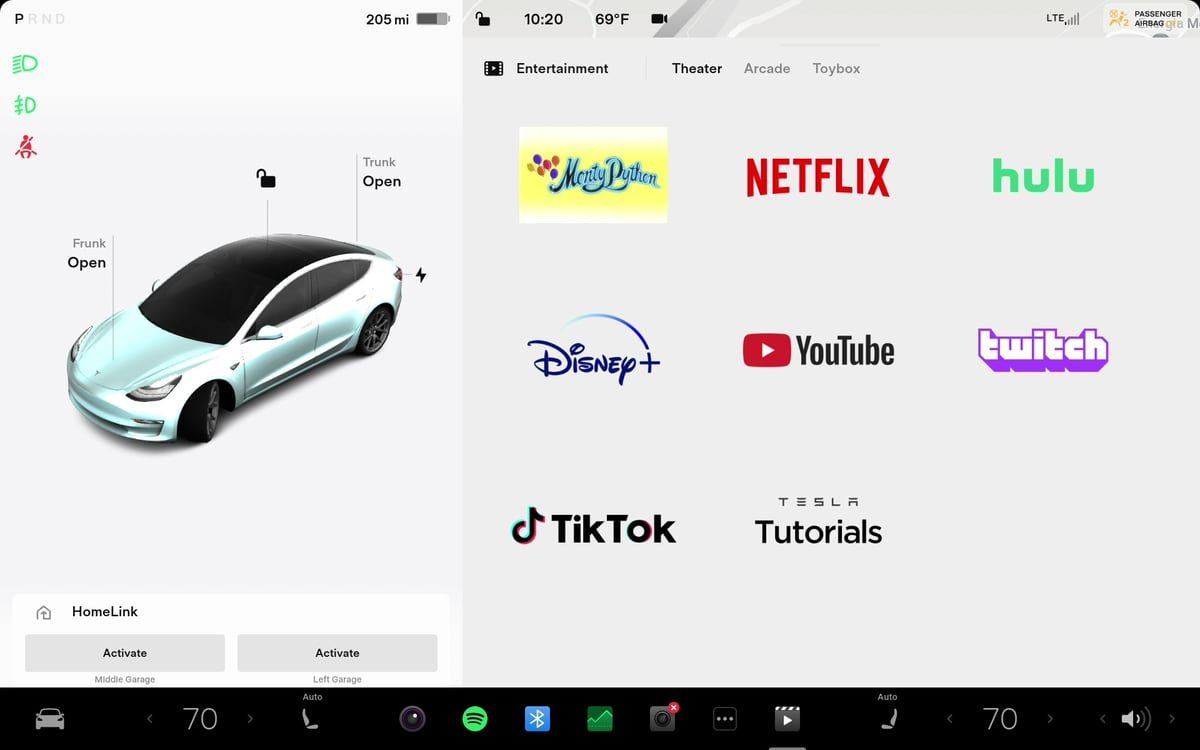
Tesla sembra stia abilitando più servizi di streaming in Tesla Theater

Tesla sembra stia aggiungendo il supporto per ulteriori piattaforme di streaming in Tesla Theater. Molti servizi che attualmente non sono integrati in Theater si avviano ora nello stesso browser a tutto schermo, privo di bordi, utilizzato da Netflix e YouTube. Visitare il sito web di un servizio attiva automaticamente la modalità a tutto schermo.
I test indicano che questo comportamento—notato per la prima volta da Jason—non è limitato ad Apple TV e si applica anche ad altre piattaforme principali.
Il comportamento è stato osservato con HBO Max, Paramount+, Peacock e Apple TV, rendendo questi servizi più facili da usare su una Tesla.
Altri servizi di streaming
I proprietari di Tesla sono da tempo in grado di guardare video tramite il browser web del veicolo mentre sono parcheggiati; la modifica riguarda il modo in cui questi siti si aprono.
In precedenza, i controlli e la barra degli indirizzi del browser rimanevano visibili finché la riproduzione video non veniva commutata a tutto schermo. Ora, per diversi servizi riconosciuti, il browser si apre direttamente in una finestra a tutto schermo in stile Tesla Theater.
Le piattaforme confermate includono:
- HBO Max
- Paramount+
- Peacock
- Apple TV
- Disney+
- Plex
Ciò si aggiunge ai servizi già offerti in Tesla Theater: Netflix, Hulu, YouTube, Twitch e TikTok. La modifica al momento non include alcuni servizi meno popolari come Tubi, Crunchyroll e Discovery+, o servizi sostitutivi della TV come Sling TV e YouTube TV. Questi possono ancora essere utilizzati tramite l'escamotage del reindirizzamento di YouTube o passando manualmente il lettore a tutto schermo una volta iniziata la riproduzione.
Tesla potrebbe apportare questi aggiornamenti prima di aggiungere altri servizi a Tesla Theater. Per ora, aggiungere questi siti ai segnalibri del browser fornisce un accesso rapido.
Le app di Tesla Theater sono solo siti web
Aggiungere un altro servizio a Theater è semplice perché Tesla Theater carica ogni fornitore in un browser privo di bordi invece che come app nativa. Tesla non sta creando app native per Netflix o altri servizi, il che significa che molti servizi supportati potrebbero essere aggiunti rapidamente.
Il motivo per cui il catalogo non si è ampliato ulteriormente non è chiaro. I possibili fattori includono il mantenimento della gestione dell'utilizzo della larghezza di banda nel veicolo o la stipula di accordi con i fornitori di streaming prima di includerli in Tesla Theater.
Schermo posteriore

Guardare sul display anteriore è semplice tramite il browser, ma il display posteriore è più complicato perché non include un browser. Tuttavia, esiste un metodo alternativo che consente di guardare quasi tutti i servizi di streaming sullo schermo posteriore.
Se venissero aggiunti altri servizi a Tesla Theater, i passeggeri posteriori ne trarrebbero il massimo vantaggio potendo visualizzare piattaforme aggiuntive più facilmente, specialmente per gli utenti che potrebbero non essere a conoscenza del metodo alternativo.
Funzionalità richieste
Data l'architettura di Tesla Theater, le app native non sono necessarie, ma la selezione relativamente piccola rimane sorprendente. Le aggiunte suggerite in precedenza includono un accesso più facile a più servizi di streaming e la possibilità di aggiungere i preferiti.
Questa modifica del browser è un passo avanti positivo; un passo logico successivo sarebbe l'aggiunta di scorciatoie all'interno dell'app Tesla Theater.
















Condividi:
Un proprietario di Tesla aggiorna con successo la sua Model 3 da HW3 a HW4
Tesla richiama quasi 3 milioni di auto in Cina per le maniglie delle portiere