
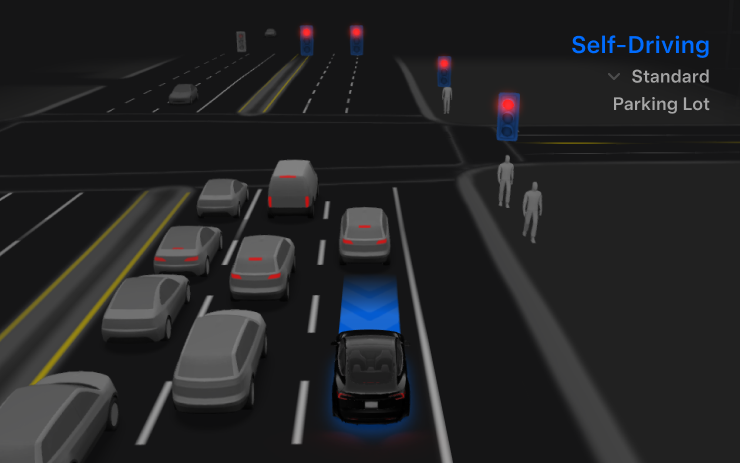
Esta actualización incluye FSD v14.2.2.3, una versión de corrección de errores. Las notas de la versión no han cambiado con respecto a FSD v14.2.2.2.
FSD (Supervisada) v14.2.2.3

Requisito: HW4
Modelos: S, 3, X, Y, CT
Full Self-Driving (Supervisada) v14.2.2.3 incluye:
- Se ha actualizado el codificador de visión de la red neuronal, aprovechando características de mayor resolución para mejorar escenarios como el manejo de vehículos de emergencia, obstáculos en la carretera y gestos humanos. (Nuevo en FSD v14.2)
- Se añadieron Opciones de Llegada para que puedas elegir dónde debe estacionar el FSD: en un estacionamiento, en la calle, en una entrada de garaje, en un garaje techado o en la acera.
- Se añadió el comportamiento de orillarse o ceder el paso a vehículos de emergencia (p. ej., patrullas de policía, camiones de bomberos, ambulancias).
- Se añadió la navegación y el cálculo de rutas a la red neuronal basada en visión para el manejo en tiempo real de carreteras bloqueadas y desvíos.
- Se añadió un Perfil de Velocidad adicional para personalizar aún más la preferencia del estilo de conducción.
- Se mejoró el manejo de puertas estáticas y dinámicas.
- Se mejoró la compensación ante escombros en la carretera (p. ej., neumáticos, ramas de árboles, cajas).
- Se mejoró el manejo de varios escenarios, incluyendo: giros sin protección, cambios de carril, vehículos que se cruzan y autobuses escolares.
- Se mejoró la capacidad del FSD para gestionar fallas del sistema y recuperarse sin problemas de un funcionamiento degradado para una mayor confiabilidad.
- Se añadieron alertas por acumulación de residuos en el parabrisas interior que puedan afectar la visibilidad de la cámara frontal. Si se ve afectado, visita el Servicio Técnico para su limpieza.
- Se añadió lavado automático de campo estrecho para proporcionar una autolimpieza rápida y eficiente de la cámara frontal, y optimizar el lavado aerodinámico a mayor velocidad del vehículo. (Solo Modelo Y 2026+)
- La visibilidad de la cámara puede provocar una mayor sensibilidad en el monitoreo de la atención. (Nuevo en FSD v14.2.1)
Mejoras próximas:
- Suavidad general y capacidad de respuesta.
- Selección de espacios de estacionamiento y calidad del mismo.
Opciones de Llegada

Requisito: HW4
Modelos: S, 3, X, Y, CT
- Ahora puedes elegir una opción de llegada como Estacionamiento, Calle, Entrada de garaje, Garaje techado o Acera para dejar pasajeros al estilo Robotaxi.
- Tus preferencias de opciones de llegada y posiciones de estacionamiento favoritas se guardan por destino.
- El modelo de razonamiento evalúa las opciones adecuadas para el destino y selecciona una predeterminada intuitiva.
- El marcador de navegación se ajusta según la Opción de Llegada seleccionada. (Añadido a las notas de la versión en FSD v14.2.2)
Perfiles de Velocidad

Requisito: HW4
Modelos: S, 3, X, Y, CT
FSD (Supervisada) ahora elige una velocidad adecuada utilizando una combinación del perfil del conductor, el límite de velocidad y el tráfico circundante.
- Se añadió un nuevo Perfil de Velocidad, SLOTH (Perezoso), con velocidades más bajas y una selección de carril más conservadora que CHILL (Relajado).
- Se añadió un nuevo Perfil de Velocidad, MAD MAX, con velocidades más altas y cambios de carril más frecuentes que HURRY (Apresurado).
- El perfil del conductor ahora influye en el comportamiento con mayor fuerza; los perfiles más asertivos permiten una velocidad máxima más alta.
- La rueda de desplazamiento derecha ahora cambia la configuración del Perfil de Velocidad en lugar de ajustar el desplazamiento preciso de la velocidad máxima en mph/kph.
Mejoras en la Interfaz de Usuario (UI)

Requisito: HW4
Modelos: S, 3, X, Y, CT
- Ahora puedes ver tus estadísticas de conducción autónoma en Controles > Piloto Automático. (Añadido a las notas de la versión en FSD v14.2.2)
- Puedes iniciar la Conducción Autónoma con un toque en la pantalla táctil desde Estacionado, o en cualquier momento mientras conduces.
- Puedes ajustar configuraciones como el Perfil de Velocidad y las Opciones de Llegada directamente desde la visualización del Piloto Automático en la pantalla central.
Confirmación de Freno

Requisito: HW4
Modelos: S, 3, X, Y, CT
La Confirmación de Freno para el botón de Iniciar Conducción Autónoma ahora está desactivada de forma predeterminada. Cuando está deshabilitada, Iniciar Conducción Autónoma ya no requiere que presiones y sueltes el freno para confirmar la activación.
Puedes habilitar la Confirmación de Freno en Piloto Automático > Confirmación de Freno.
Full Self-Driving (Supervisada)

Requisito: HW4
Modelos: S, 3, X, Y, CT
Con tu supervisión, Full Self-Driving (Supervisada) puede conducir tu Tesla a casi cualquier lugar. Puede comenzar desde una posición estacionada, cambiar de carril, seleccionar bifurcaciones para seguir tu ruta de navegación, maniobrar alrededor de otros vehículos y objetos, realizar giros a la izquierda y derecha, y estacionarse en tu destino. Tú y cualquier persona que autorices deben extremar la precaución y permanecer atentos. No hace que el vehículo sea autónomo. No te confíes.
Full Self-Driving (Supervisada) está habilitada en tu vehículo. Para usarla, presiona el botón Iniciar Conducción Autónoma en la interfaz o presiona el botón de la rueda de desplazamiento derecha una vez. Puedes desactivar Full Self-Driving (Supervisada) en la Configuración del Piloto Automático.
Grok con Comandos de Navegación (Beta)

Requisito: AMD Ryzen
Modelos: S nuevo, 3, X nuevo, Y, CT
Grok ahora puede añadir y editar destinos de navegación, actuando como un guía personal. Puedes pedirle que navegue al mejor restaurante tailandés cercano, encontrar un Supercargador a poca distancia de una cafetería o planificar un recorrido turístico romántico. Esto requiere Conectividad Premium o una conexión Wi-Fi. Las conversaciones son anónimas para Tesla y no están asociadas a tu vehículo.
Para usar los Comandos de Navegación, establece la personalidad de Grok en Asistente. Ve a Lanzador de Apps > Grok, o mantén presionado el botón de voz en el volante después de iniciar sesión en Grok.
Photobooth de Tesla

Disponible: En todo el mundo
Requisito: AMD Ryzen
Modelos: S nuevo, 3, X nuevo, Y, CT
Convierte el auto en una cabina de fotos: toma selfies desde dentro de tu Tesla y aplica filtros, pegatinas y emojis. Puedes compartir fotos directamente desde la aplicación de Tesla. El vehículo debe estar en Estacionado (P). Requiere la versión 4.51.5+ de la aplicación Tesla.
Ábrelo a través de Lanzador de Apps > Toybox > Photobooth.
Actividad en Vivo del Modo Perro en iOS

Disponible: En todo el mundo
Modelos: S nuevo, 3, X nuevo, Y, CT
Cuando el Modo Perro está activado, tu iPhone ahora muestra una Actividad en Vivo con información actualizada sobre la temperatura y el clima. Con Conectividad Premium, también recibirás instantáneas periódicas del habitáculo. Requiere la versión 4.51.5+ de la aplicación Tesla.
Actualización del Visor de Dashcam

Disponible: En todo el mundo
Requisito: HW3 o HW4
Modelos: S, 3, X, Y, CT
Los clips de la Dashcam ahora muestran detalles adicionales como la velocidad, el ángulo del volante y el estado de conducción autónoma. Estos datos son visibles en el Visor de Dashcam durante la reproducción tanto en la pantalla del vehículo como en la aplicación Tesla. Requiere Conectividad Premium y la versión 4.51.5+ de la aplicación Tesla.
Para habilitar la visualización en tu teléfono, ve a Controles > Seguridad y activa Ver Cámara a través de la App Móvil.
Actualizaciones del Modo Santa

Disponible: En todo el mundo
Modelos: S, 3, X, Y, CT
El Modo Santa añade efectos navideños durante todo el año, incluyendo muñecos de nieve festivos, árboles, un timbre de bloqueo y efectos de nieve para una experiencia visual en 3D.
Encuéntralo en Lanzador de Apps > Toybox > Santa.
Nota editorial: Aunque las Actualizaciones del Modo Santa no aparecen en las notas de la versión para los vehículos Model S y Model X antiguos, la función también está incluida.
Actualización del Espectáculo de Luces

Disponible: En todo el mundo
Modelos: S nuevo, 3, X nuevo, Y, CT
Un nuevo Espectáculo de Luces, Jingle Rush, está disponible. Puedes iniciarlo inmediatamente o programarlo con hasta 10 minutos de antelación, ya sea en un vehículo o sincronizado con amigos. Los creadores de Espectáculos de Luces pueden controlar la iluminación interior, añadir efectos de color a la pantalla y crear espectáculos personalizados más largos. Para ejecutar un espectáculo personalizado, guarda los archivos en una carpeta LightShow en una memoria USB, conéctala y selecciona el espectáculo.
Inícialo desde la aplicación de Tesla o ve a Lanzador de Apps > Toybox > Espectáculo de Luces en el vehículo.
Tienda de Pintura (Paint Shop)

Disponible: En todo el mundo
Modelos: 3, Y
Personaliza tu avatar de Tesla con tintes de ventana, vinilos y placas de matrícula. Puedes elegir entre diseños integrados o crear y subir los tuyos usando una memoria USB.
Ve a Lanzador de Apps > Toybox > Tienda de Pintura, o toca el botón de pintura o de la matrícula en Controles > Software.
Actualización de la Tienda de Pintura

Disponible: En todo el mundo
Modelos: CT
La Tienda de Pintura ahora incluye opciones de personalización para el Cybertruck, como nuevos vinilos, opciones de tinte para ventanas y diseños de placas de matrícula.
Ábrela a través de Lanzador de Apps > Toybox > Tienda de Pintura.
Mejoras en la Navegación

Disponible: En todo el mundo
Modelos: S, 3, X, Y, CT
Ahora puedes reordenar tus favoritos de navegación, establecer Casa o Trabajo colocando un marcador en cualquier parte del mapa y ver destinos sugeridos basados en viajes y hábitos recientes.
Ruta Automática con Carriles HOV

Modelos: S nuevo, 3, X nuevo, Y, CT
La navegación ahora ofrece una opción para utilizar automáticamente carriles para vehículos de alta ocupación (HOV) según el tiempo, el número de pasajeros y las restricciones de la carretera.
Habilítala en Controles > Navegación > Usar HOV.
Mapas de Sitios de Supercargadores

Requisito: AMD Ryzen
Modelos: S nuevo, 3, X nuevo, Y, CT
En ubicaciones seleccionadas de Supercargadores, puedes tocar Ver Mapa del Sitio para ver un diseño en 3D. Al navegar a un sitio piloto, el diseño y el estado en vivo de los puestos (Disponible / Ocupado / Fuera de servicio) aparecen al llegar.
Teléfono Dejado en el Cargador Inalámbrico

Disponible: En todo el mundo
Requisito: Cargador inalámbrico
Modelos: S nuevo, 3, X nuevo, Y
Tu vehículo emitirá un sonido unos segundos después de que se cierren las puertas si un teléfono se deja en el cargador inalámbrico y no se detectan ocupantes.
Configúralo en Controles > Bloqueos > Sonido de Teléfono Dejado en el Cargador Inalámbrico.
Teléfono Olvidado
Disponible: En todo el mundo
Requisito: Banda ultraancha (UWB)
Modelos: 3 nuevo, Y nuevo, CT
Tu vehículo emitirá un sonido unos segundos después de que se cierren las puertas si una llave telefónica está dentro del habitáculo o si un teléfono se deja en el cargador inalámbrico y no se detectan ocupantes. La detección de llave telefónica requiere dispositivos compatibles con UWB.
Configúralo en Controles > Bloqueos > Sonido de Teléfono Olvidado.
Guardar Límite de Carga por Ubicación

Disponible: En todo el mundo
Modelos: S, 3, X, Y, CT
Mientras estás estacionado, ahora puedes guardar un límite de carga para tu ubicación actual. La próxima vez que cargues allí, ese límite se aplicará automáticamente.
Ve a Controles > Carga.
Simulador de Acoplamiento de SpaceX

Disponible: En todo el mundo
Requisito: AMD Ryzen
Modelos: S nuevo, 3, X nuevo, Y, CT
Este simulador de acoplamiento en 3D te permite intentar el acoplamiento con la Estación Espacial Internacional usando controles basados en interfaces reales utilizadas por los astronautas de la NASA.
Para jugar, cambia a Estacionado (P) y abre Lanzador de Apps > Arcade > SpaceX.
Actualizaciones Menores

Disponible: En todo el mundo
Modelos: S, 3, X, Y, CT
- Las almohadillas de carga inalámbrica para teléfonos ahora pueden habilitarse o deshabilitarse en Controles > Tomas de corriente y Modificaciones.
- Tu vehículo ahora envía una alerta móvil si alguna puerta del habitáculo se deja abierta mientras el Modo Perro está activo.
- Puedes añadir pistas de Spotify a tu cola directamente desde la pantalla de búsqueda.
- Rave Cave ahora admite colores del arco iris; las luces de acento cambian con tu música. Ve a Lanzador de Apps > Toybox > Sincronización de Luces. (Añadido en la actualización 2025.44.25.5)
- Puedes desplazarte por listas de reproducción, álbumes, podcasts, audiolibros y tu biblioteca de Spotify grandes sin necesidad de paginar. (Requiere AMD Ryzen)
- El Sonido de Bloqueo ahora incluye el Ciclo de Luz del Modo Tron. Ve a Lanzador de Apps > Toybox > Boombox > Sonido de Bloqueo.
- Puedes permitir que tu vehículo comparta datos de carga con Tesla para admitir funciones como Estadísticas de Carga en la aplicación Tesla. (Añadido en la actualización 2025.44.25.3)
Nuevas opciones de ruedas

Disponible: En todo el mundo
Estado: No documentado
Modelos: S, 3, X, Y, CT
Los diseños de ruedas que anteriormente estaban disponibles en el Model 3 y Model Y estándar ahora se pueden seleccionar para todos los vehículos en la visualización del vehículo.
Las nuevas llantas Prismata de 18” (Model 3) y Aperture de 18” están disponibles para todos los modelos en la sección de neumáticos. Para verlas o elegirlas, vaya a Controles > Servicio y seleccione Neumáticos y ruedas.
Carriles exprés

Estado: No documentado
Modelos: S, 3, X, Y, CT
Algunos vehículos ahora admiten carriles exprés en la navegación. Al igual que los carriles para vehículos de alta ocupación (HOV) o las carreteras de peaje, los carriles exprés pueden proporcionar viajes más rápidos y cobrar tarifas según la ocupación del vehículo, el tipo de vehículo y la hora del día.
Esta actualización añade un ajuste de navegación que le permite activar o desactivar los carriles exprés. La función no está disponible en todos los vehículos y es posible que Tesla todavía la esté probando.
Los mapas en directo de los Supercargadores muestran los modelos exactos

Disponible: En todo el mundo
Requisito: AMD
Estado: No documentado
Modelos: S, 3, X, Y, CT
Los nuevos mapas de ubicación de los Supercargadores proporcionan una vista 3D en directo del lugar y ahora muestran los modelos reales de vehículos que se están cargando en cada puesto.
Indicará el tipo de vehículo en cada puesto, como el Model Y original, el nuevo Model Y, un Cybertruck, o si es un vehículo que no es de Tesla el que se está cargando.
Estos mapas también le ayudan a ver qué puestos están disponibles y dónde están ubicados, qué puestos son accesibles para personas con discapacidad y si el lugar cuenta con puestos de carga directa.
Soporte de zoom en el visor de la Dashcam

Disponible: En todo el mundo
Requisito: AMD
Estado: No documentado
Modelos: S, 3, X, Y, CT
En el visor de la Dashcam, ahora puede hacer zoom con los dedos mientras ve un vídeo y desplazarse por el vídeo cuando esté ampliado.
Nota: Esto se limita a vehículos con el procesador de infoentretenimiento AMD Ryzen.
Mejora en la advertencia de visibilidad de la cámara

Disponible: En todo el mundo
Estado: No documentado
Modelos: S, 3, X, Y, CT
Las advertencias de visibilidad de la cámara ahora etiquetan la vista de la cámara que está obstruida, dejando claro qué cámara necesita limpieza.
La vista se presenta de forma similar al visor de la Dashcam, con la ubicación de la cámara superpuesta en una imagen de esa cámara. Anteriormente, la cámara no estaba etiquetada, lo que dificultaba saber cuál estaba afectada.
El sistema puede mostrar Delantera para la cámara frontal situada debajo del parabrisas y fascia para la cámara del parachoques delantero.
Visualización de Supercargador V4

Disponible: En todo el mundo
Estado: No documentado
Modelos: S, 3, X, Y, CT
Tesla introdujo recientemente visualizaciones de cargadores en la pantalla del vehículo, con diferentes gráficos para distintos tipos de cargadores (como el Conector móvil, el Conector de pared, los Supercargadores v2 y v3, y una visualización genérica para cargadores de terceros).
Con esta actualización, Tesla añade una visualización dedicada para los Supercargadores V4, que anteriormente no tenían un gráfico exclusivo.
Iconos de vinilo y matrícula

Disponible: En todo el mundo
Estado: No documentado
Modelos: S, 3, X, Y, CT
Ahora es más fácil acceder a las opciones de vinilo y matrícula desde Controles > Software. Debajo de la visualización del vehículo, verá una foto de la matrícula seleccionada y un icono de papel de regalo que le lleva directamente a las opciones de visualización.
El icono de papel de regalo sustituye al cuadrado de color anterior que abría el Colorizador del vehículo.
Notificación del modo Lavado de coche

Disponible: En todo el mundo
Estado: No documentado
Modelos: S, 3, X, Y, CT
Tesla ahora muestra una notificación de recordatorio para activar el modo Lavado de coche cuando está cerca de un túnel de lavado, lo que facilita su activación rápida.
Esto es parte de las mejoras del modo Lavado de coche incluidas en esta actualización.
Freno de estacionamiento

Disponible: En todo el mundo
Estado: No documentado
Modelos: S, 3, X, Y, CT
Tesla ha eliminado la opción de activar manualmente el freno de emergencia (freno de estacionamiento) desde la pantalla del vehículo. Anteriormente, los usuarios podían activarlo cerca de la parte inferior de Controles > Seguridad.
Sin embargo, el freno de emergencia todavía se puede activar usando la palanca de marchas o el icono de Estacionamiento (Park) en la pantalla táctil.
Rediseño del modo Lavado de coche

Disponible: En todo el mundo
Estado: No documentado
Modelos: S, 3, X, Y, CT
El modo Lavado de coche ha sido rediseñado. La pantalla ahora muestra una visualización del vehículo a la derecha y la lista de verificación a la izquierda.
El modo Lavado de coche ofrece una lista de verificación en tiempo real para ayudar a preparar el vehículo. Si algo no está en el estado correcto (por ejemplo, una ventana o el maletero está abierto), el punto junto a ese elemento se vuelve rojo.
La opción Activar modo de libre rodaje en la parte inferior es ahora más destacada, lo que facilita encontrar cómo poner el vehículo en punto muerto.
Cambiar a Bluetooth

Disponible: En todo el mundo
Estado: No documentado
Modelos: S, 3, X, Y, CT
Si su teléfono está conectado por Bluetooth y el vehículo detecta audio reproduciéndose en su teléfono, el coche ahora le pedirá que cambie a la fuente de audio Bluetooth para que el sonido se reproduzca a través de los altavoces del vehículo.
Esto ayuda a evitar la situación habitual en la que los usuarios inician el audio en su teléfono y experimentan una pausa antes de darse cuenta de que el vehículo no está configurado en audio Bluetooth, y reduce la necesidad de abrir y seleccionar manualmente la aplicación Bluetooth.
Nuevas visualizaciones con Unreal Engine

Disponible: En todo el mundo
Estado: No documentado
Modelos: S nuevo, X nuevo (S y X a partir de 2021)
Las visualizaciones presentadas en el Model S y Model X de 2026 ahora están disponibles en todos los vehículos Model S y Model X de 2021 en adelante.
Junto con los efectos visuales actualizados en el cuadro de instrumentos y los menús, ahora puede rotar la visualización del vehículo libremente en el menú Controles para ver el coche desde cualquier ángulo.
El módulo emergente de estacionamiento que se utiliza para abrir las puertas y el maletero ahora también es interactivo, permitiéndole desplazarse y ampliar la vista del vehículo.
Controles de suspensión neumática

Disponible: En todo el mundo
Estado: No documentado
Modelos: S nuevo, X nuevo
Los controles de suspensión neumática para el Model S y el Model X se han movido al área principal de Controles, en lugar de estar ubicados en una pestaña de Suspensión independiente.
Los modelos de 2026 ya incluyen esta disposición. Para los vehículos de 2025 y anteriores, se mantiene el menú de Suspensión más detallado, en lugar de la versión simplificada utilizada en los modelos de 2026.
Juego Boomerang Fu eliminado

Disponible: En todo el mundo
Estado: No documentado
Modelos: S, 3, X, Y, CT
El juego Boomerang Fu ha sido eliminado y reemplazado por el simulador de atraque de SpaceX. Es probable que la licencia del juego haya expirado este año, ya que se introdujo en la actualización de vacaciones del año pasado.
Favoritos en el mapa

Disponible: En todo el mundo
Estado: No documentado
Modelos: S, 3, X, Y, CT
Tesla realizó múltiples cambios en los favoritos y en Casa/Trabajo en esta actualización, incluido un cambio no documentado: las ubicaciones de favoritos, Casa y Trabajo ahora están fijadas directamente en el mapa.
Además de colocar los iconos de Casa/Trabajo en el cuadro de Navegación y mostrar las dos sugerencias principales debajo, las ubicaciones fijadas facilitan la orientación mientras se mueve por el mapa y ver cuándo está cerca de un lugar guardado.
Ver almacenamiento de la Dashcam

Disponible: En todo el mundo
Estado: No documentado
Modelos: S, 3, X, Y, CT
Ahora puede ver cuánto espacio se utiliza en su unidad USB de la Dashcam, incluido el uso de la Dashcam y el tamaño total de la unidad.
Para verlo, vaya a Controles > Seguridad y desplácese hacia abajo hasta Dashcam.
Filtros de la Dashcam

Disponible: En todo el mundo
Estado: No documentado
Modelos: S, 3, X, Y, CT
El visor de la Dashcam ahora incluye más organización más allá de las pestañas de Dashcam y Sentry, añadiendo categorías para los vídeos de la Dashcam.
Los clips se agrupan automáticamente según lo que los activó, como tocar el claxon, guardado manual, tirar de la manilla y más.
Idioma hebreo añadido

Disponible: En todo el mundo
Estado: No documentado
Modelos: S, X, CT
El hebreo ya está disponible como idioma para la pantalla táctil.
Para cambiarlo, coloque el vehículo en Estacionamiento (Park) y vaya a Controles > Pantalla > Idioma de la pantalla táctil.
Mejoras en el Modo de servicio

Disponible: En todo el mundo
Estado: No documentado
Se añadió el panel de Componentes de control térmico al Modo de servicio
El panel de Componentes de control térmico se ha añadido al Modo de servicio para apoyar el diagnóstico térmico de ruido, vibración y aspereza (NVH). Permite el control individual de los componentes térmicos, estableciendo objetivos específicos y barriendo rangos operativos con retroalimentación en tiempo real. También incluye una vista estática en 3D de la bomba de calor, incluido el radiador, el motor del soplador, la rejilla y las bombas.
Modelos: Model S (2021+), Model 3 (bomba de calor), Model X (2021+), Model Y, Cybertruck
Actualización del panel de Airbags - Nuevas rutinas de Desarmar Airbag y Comprobación de resistencia
Una nueva rutina en el panel de Airbags permite a los usuarios desarmar los airbags. Esto significa que los usuarios ya no necesitan desconectar la batería de bajo voltaje (LV) al diagnosticar el sistema de seguridad y retención. Después de desarmar, se pueden tocar los componentes individuales (como un airbag o pretensor) para ver las lecturas de resistencia.
Modelos: Model S (2021+), Model 3, Model X (2021+), Model Y, Cybertruck
















Compartir:
Tesla lanza el Model Y de 7 plazas en EE. UU., con pantalla más grande, emblemas y revestimiento de techo oscuros, y nuevas llantas
Los próximos pasos de Tesla en el rediseño de sus manijas de puerta para cumplir con las nuevas regulaciones