
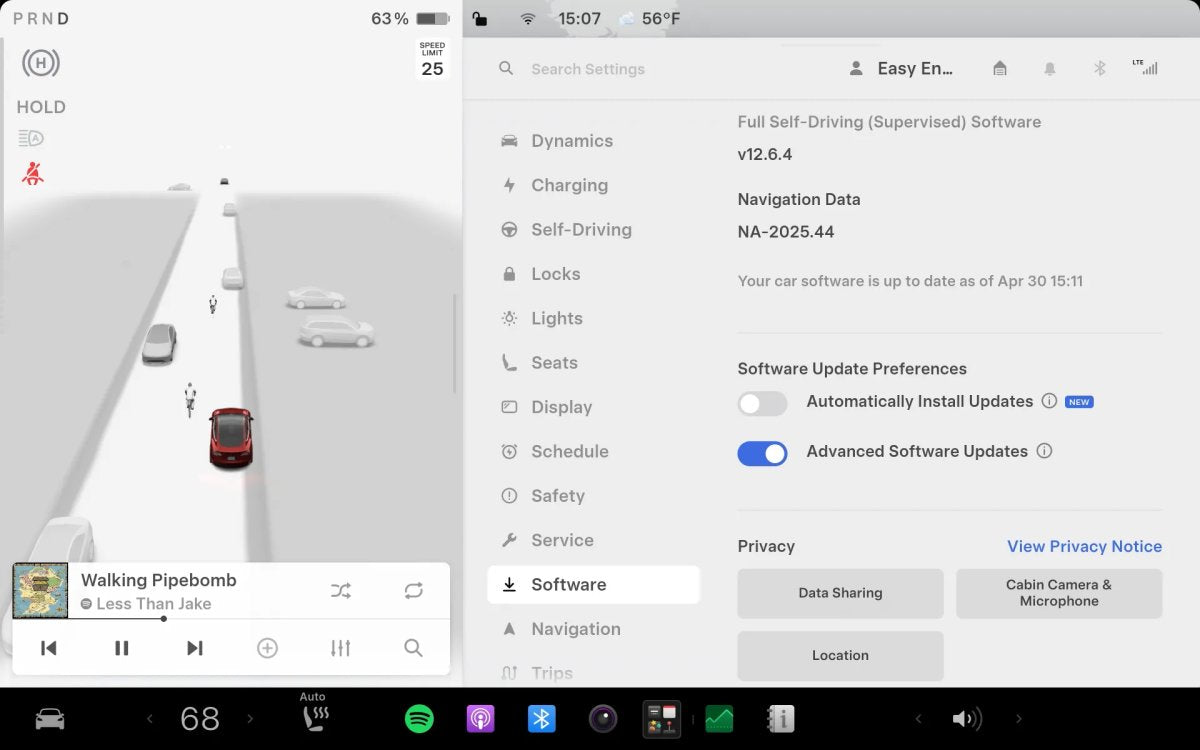

With the 2026 Spring Update, Tesla introduced a quality-of-life feature to streamline software installations. While many enjoy seeing what changes with new updates, routine installs—especially small bug fixes—can feel like a task. This ties into the Standard / Advanced option: receive updates earlier with potential bugs (followed by fixes), or wait for a more stable build.
The new Automatically Install Updates capability aims to handle installations seamlessly without requiring user permission. Phones have performed automatic updates for years, but whereas a phone typically finishes in minutes, a Tesla update can take up to 45 minutes, during which the vehicle cannot be used.
How It Works
Automatic Updates is off by default; owners can enable it under Controls > Software > Automatically Install Updates.
After an update downloads automatically as usual, the vehicle will schedule the installation on its own, provided these requirements are met:
- Vehicle must be parked at the location you have set as Home
- The vehicle must have a minimum charge state of 10% at the time of installation

Time of Install
At this time, you cannot set a preferred installation window; all automatic updates are scheduled for 2:00 AM local time.
This limitation may interfere with a small number of owners’ schedules. These safeguards are intended to prevent the vehicle from starting an update when you may need it.
As a result, night drivers may still need to install updates manually.
After an update completes, a push notification confirms that it’s finished.
Automatic updates are part of the much larger Spring Update (2026.14), which also includes features like Hey Grok, Pet Mode improvements, and more. This feature is available on the 2021+ Model S, Model X, Model 3, Model Y, and Cybertruck.































Condividi:
Tesla Celebrates 750,000 Vehicles Built at Giga Berlin
Tesla Introduces New Remote Meter for Wall Connector