
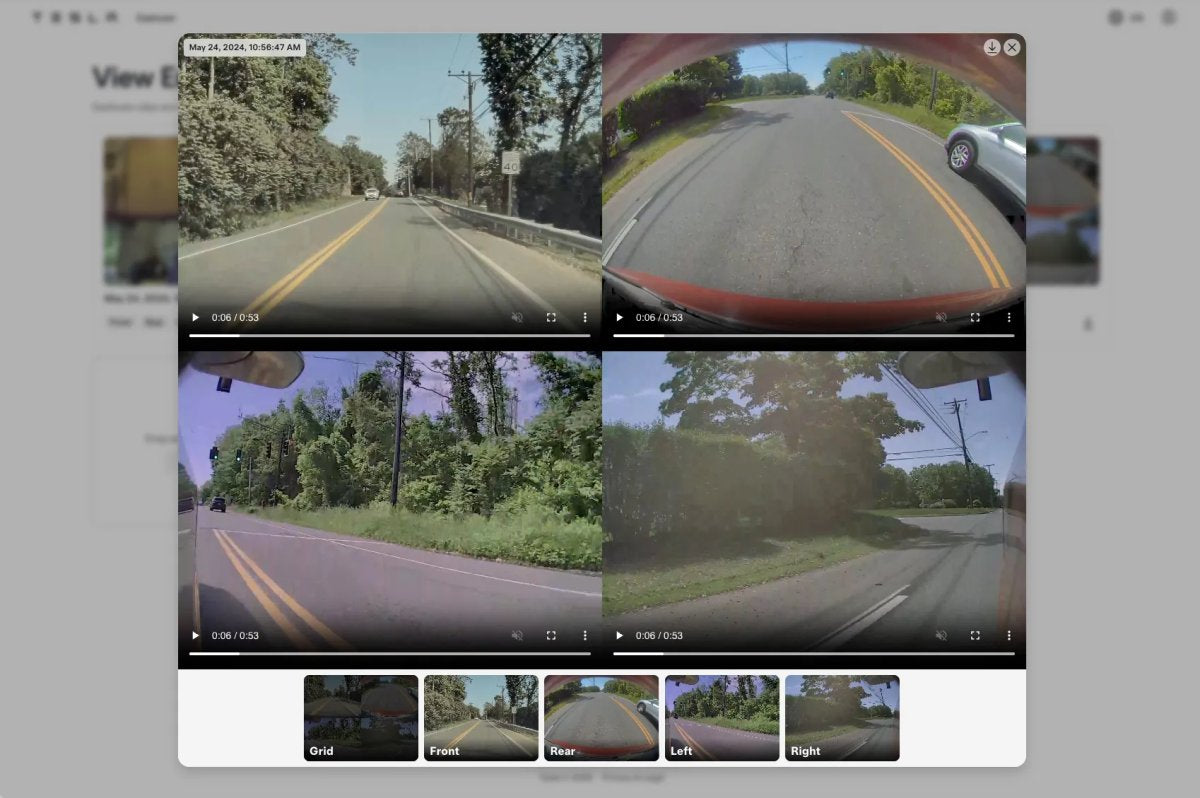
Tesla introduced a browser-based Dashcam viewer for accessing footage outside the vehicle. The site, available at dashcam.tesla.com, arrived with software update 2026.20, which added dashcam clip encryption and began rolling out last week.
For owners, update 2026.20 delivered privacy enhancements and added new parental controls to limit access to entertainment apps such as Tesla Arcade.
For technicians and DIY users, the same release added troubleshooting panels and a new camera cleaning guide in Service Mode. If you plan to review clips on a computer with the new Dashcam encryption (enabled by default), the web viewer is required.
Seamless Integration and Decryption
Recordings on a Tesla storage drive remain unencrypted until the vehicle receives update 2026.20. After the update, footage is protected by default with an encryption key linked to the owner’s Tesla account, and owners can opt out via Controls > Safety. Encrypted clips cannot be played on unauthorized devices, which helps safeguard data if the USB drive is taken.
When visiting the web viewer, users sign in with their Tesla account. After authentication, the tool retrieves the account-specific encryption keys and uses them to decrypt protected clips in real time.
The viewer also works with standard, unencrypted recordings. All video processing occurs locally on the user’s computer, so clips are not uploaded to external servers or the cloud.
A Multi-Camera Grid Layout
The interface closely matches the in-vehicle Dashcam Viewer. Users drag and drop the files they want to review into the browser, and the site organizes them by filename and time, automatically combining camera angles from the same timestamp into a single clip.

Pressing play assembles front, rear, left, and right views into a synchronized four-camera grid. Viewers can switch to individual angles along the bottom bar. A Download All button bundles all loaded items into a ZIP for local storage or backup.

Expanding Functionality for Global Owners
The web viewer builds on recent video upgrades. In April, the Spring 2026 Software Update extended the rolling dashcam history buffer to as much as 24 hours of driving, provided a 1TB or larger USB drive is installed. Reviewing that volume of footage is now simpler on laptops or phones without installing any additional software.

The site is fully usable on mobile devices, so clips can be checked on the go with a USB OTG adapter. However, the portal appears to be unavailable in several countries for now.
As Tesla adds features such as built-in digital zoom and pan and a real-time telemetry overlay, the lightweight browser tool gives owners immediate, secure, and straightforward access to their recordings whenever needed.
















Partager:
How a 300-Foot Cliff Fall Proves the Tesla Model 3 is Built Different
Tesla China Hits 2026 High With Major Sales Surge in May