
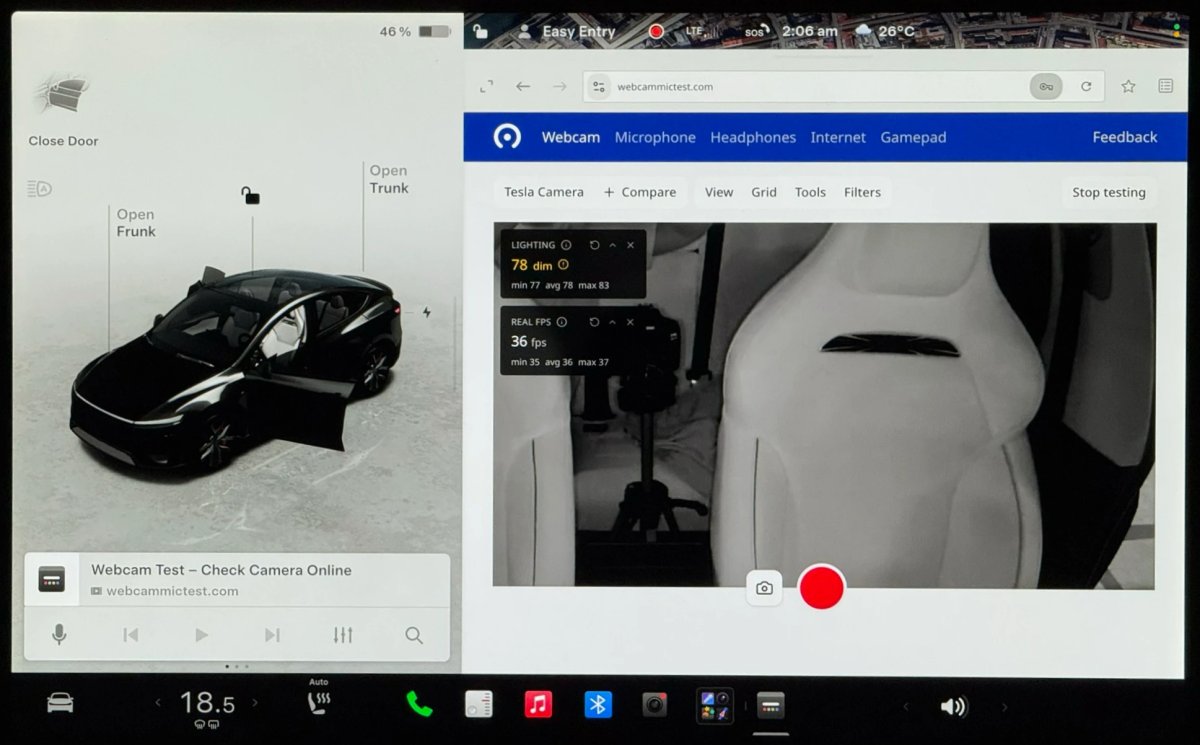
La mise à jour d'été 2026.26 de Tesla améliore le navigateur embarqué avec un accès au microphone et à la caméra pour les appels vidéo sur des services tels que Microsoft Teams, Discord et Slack, ainsi que la synchronisation des favoris et un zoom par défaut plus élevé qui agrandit le contenu des pages.
Accès à la caméra et au microphone
Les sites web peuvent désormais demander l'accès au microphone de l'habitacle et à la caméra intérieure du véhicule via le navigateur Tesla. La caméra reste disponible uniquement lorsque le véhicule est garé, et une invite à l'écran permet à l'utilisateur d'approuver ou de refuser chaque demande.
Cela permet des appels vidéo basés sur le navigateur avec des services tels que Microsoft Teams, Google Meet, Discord, Slack, et plus encore. Le flux vidéo est automatiquement recadré pour se concentrer sur la personne assise sur le siège conducteur.
Auparavant, Zoom était le seul service autorisé à utiliser la caméra intérieure ; cependant, Zoom n'était qu'un navigateur sans bordure, et cette fonctionnalité fonctionne désormais avec n'importe quelle plateforme web.
Pour tester l'implémentation sans vous connecter à un service, vous pouvez visiter WebcamMicTest.com pour vérifier le micro et la caméra.
Cette fonctionnalité est limitée aux véhicules équipés d'AMD Ryzen en raison de leur puce d'infodivertissement plus puissante.

Synchronisation des favoris du navigateur
La mise à jour ajoute la possibilité de synchroniser les favoris du navigateur Tesla entre les véhicules. Les sites enregistrés peuvent apparaître dans une autre Tesla utilisant le même profil, y compris un autre véhicule personnel, une location ou un véhicule de prêt Tesla.
Les favoris et les sites fréquemment visités qui s'affichent sur la page des nouveaux onglets sont enregistrés par profil de conducteur. La synchronisation des favoris s'effectue automatiquement lors de l'utilisation d'un profil Tesla.
Zoom du navigateur
Le navigateur Tesla, bien que basé sur Chromium, ne permet pas d'ajuster manuellement le niveau de zoom. Avec la mise à jour d'été, le niveau de zoom par défaut a été augmenté, ce qui rend les éléments tels que les icônes des sites fréquemment visités plus grands.
Ce changement agrandit les images et le texte sur n'importe quel site, mais il peut également amener les sites web réactifs tels que X et YouTube à charger des mises en page de style tablette ou mobile, car la zone de page web disponible semble plus étroite.
Davantage de support pour Tesla Theater
La mise à jour ajoute la prise en charge de la lecture plein écran sur plusieurs sites de streaming vidéo. Le navigateur passe désormais en plein écran lorsque vous visitez certains sites web de streaming, notamment HBO Max, Prime Video, et plus encore.
Cela augmente efficacement la prise en charge de Tesla Theater, bien que vous ne puissiez toujours pas lire ces services vidéo sur l'écran arrière sans solution de contournement.
Tesla a probablement également mis à jour la version Chromium sous-jacente du navigateur, ce qui corrige des bugs et apporte la prise en charge des normes HTML plus récentes.
Dans l'ensemble, la mise à jour d'été 2026.26 apporte au navigateur embarqué l'accès au microphone et à la caméra, la synchronisation des favoris, un zoom par défaut plus élevé et une prise en charge plus large de la vidéo en plein écran.
















Partager:
Tesla immatricule 79 nouveaux robotaxis au Texas en une seule journée
Rivian intègre Waze, Tesla devrait-il faire de même ?