
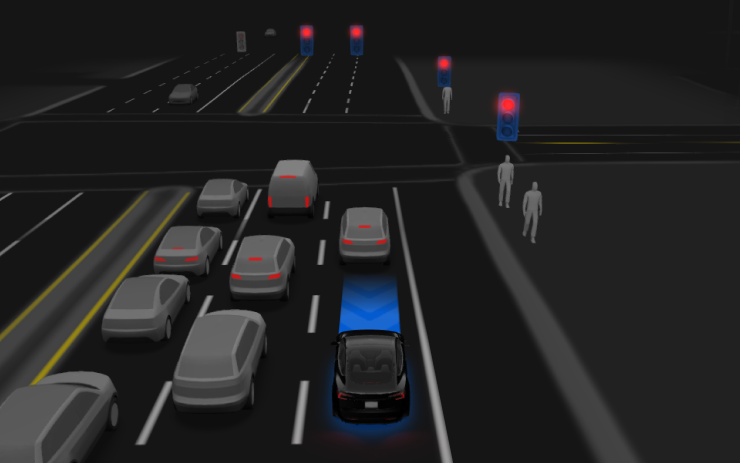
Cette mise à jour inclut la FSD v14.3.10. Les notes de version sont identiques à celles de la FSD v14.3.9, avec l'ajout de la fonction « Véhicule à domicile » (Vehicle-to-Home) avec prise en charge du Powerwall pour le Cybertruck.
Véhicule à domicile avec Powerwall
En cas de coupure de courant, votre véhicule peut prolonger la durée d'autonomie de votre domicile en partageant l'énergie de sa batterie avec votre Powerwall. Lorsqu'il est branché et activé, il complétera automatiquement les besoins énergétiques de votre maison selon les besoins.
Pour l'activer, ouvrez Recharge > Powershare. Cette fonction est opérationnelle lorsque le véhicule est stationné et connecté à un Wall Connector compatible, avec une charge supérieure à votre limite de décharge définie. Nécessite un Powerwall.
Évitement automatique de collision
L'évitement automatique de collision peut activer la Conduite entièrement autonome (supervisée) pour aider à maintenir la sécurité du véhicule, puis poursuivre la conduite. Il peut s'activer pendant que vous conduisez manuellement si le système détecte que vous n'êtes pas suffisamment attentif à la route (par exemple, si vous vous tournez vers la banquette arrière) ou si la Conduite entièrement autonome (supervisée) a été désactivée par inadvertance.
Consultez votre manuel du propriétaire pour plus de détails.
FSD (supervisée) v14.3.10
La Conduite entièrement autonome (supervisée) v14.3.10 inclut les changements et améliorations suivants :
- L'étape d'entraînement par apprentissage par renforcement (RL) du réseau neuronal FSD a été mise à niveau, améliorant les performances dans une grande variété de scénarios de conduite.
- L'encodeur de vision du réseau neuronal a été mis à niveau, améliorant la compréhension dans des scénarios rares et à faible visibilité, renforçant la compréhension de la géométrie 3D et étendant la compréhension des panneaux de signalisation.
- Le compilateur et l'environnement d'exécution de l'IA ont été entièrement réécrits avec MLIR, ce qui permet un temps de réaction 20 % plus rapide et améliore la vitesse d'itération des modèles.
- Atténuation des biais de voie inutiles et des comportements mineurs de suivi trop rapproché.
- Amélioration de la détermination dans le choix des places de stationnement et les manœuvres.
- Amélioration de la prédiction du point de stationnement, désormais affiché sur une carte avec une icône P.
- Réponse améliorée face aux véhicules d'urgence, bus scolaires, contrevenants aux règles de priorité et autres véhicules rares.
- Gestion améliorée des petits animaux en concentrant l'entraînement RL sur des exemples plus complexes et en ajoutant des récompenses pour une meilleure sécurité proactive.
- Amélioration de la gestion des feux de circulation aux intersections complexes avec des feux composés, des routes courbes et les arrêts aux feux orange — grâce à l'entraînement sur des exemples RL difficiles provenant de la flotte Tesla.
- Gestion améliorée des objets rares et inhabituels qui s'étendent, pendent ou dépassent sur la trajectoire du véhicule en collectant des événements peu fréquents issus de la flotte.
- Gestion améliorée des dégradations temporaires du système en conservant le contrôle et en se rétablissant automatiquement sans intervention du conducteur, réduisant ainsi les désengagements inutiles.
- Amélioration de la sensibilité du système de surveillance du conducteur avec un meilleur suivi du regard, une meilleure prise en charge du port de lunettes et une plus grande précision dans des conditions d'éclairage variables.
- Unification du modèle entre « Actually Smart Summon », la FSD et le Robotaxi pour un comportement plus performant et fiable. (Nouveauté de la FSD v14.3.2 pour les véhicules autres que le Cybertruck, nouveauté de la FSD v14.3.4 pour le Cybertruck)
- La vitesse maximale de l'« Actually Smart Summon » est désormais augmentée à 13 km/h (8 mph). (Ajouté dans la FSD v14.3.3, non disponible sur Cybertruck)
- Après avoir repris le contrôle, sélectionnez une raison d'intervention sur l'écran principal pour aider Tesla à améliorer la conduite autonome. (Nouveauté de la FSD v14.3.2)
- La distance parcourue en FSD (supervisée) sans intervention est désormais visible, et l'application Conduite autonome affiche votre plus longue série sans intervention. (Ajouté dans la FSD v14.3.3)
- Les options de stationnement s'affichent désormais sur la carte à votre arrivée à destination. (Ajouté dans la FSD v14.3.4)
Améliorations à venir
- Étendre le raisonnement à tous les comportements au-delà de la gestion de la destination.
- Ajouter l'évitement des nids-de-poule.
Conduite entièrement autonome (supervisée)

Lorsqu'elle est supervisée, la Conduite entièrement autonome (supervisée) peut conduire votre Tesla presque partout : elle peut démarrer depuis une position stationnée, changer de voie, choisir des embranchements pour suivre votre itinéraire de navigation, contourner des véhicules et des objets, effectuer des virages à gauche et à droite, et se garer à votre destination. Vous et toute personne que vous autorisez devez rester attentifs et faire preuve d'une vigilance accrue. Cela ne rend pas le véhicule autonome. Ne soyez pas complaisant.
La Conduite entièrement autonome (supervisée) est activée sur votre véhicule. Pour l'utiliser, appuyez sur le bouton Lancer la conduite autonome sur l'interface utilisateur ou appuyez une fois sur la molette de défilement droite. Vous pouvez désactiver la Conduite entièrement autonome (supervisée) dans les réglages de l'Autopilot.
















Partager:
Tesla ajoute la prise en charge des clés d'accès à l'application Tesla
Comment Tesla a amélioré la navigation automatique dans la mise à jour 2026.26