
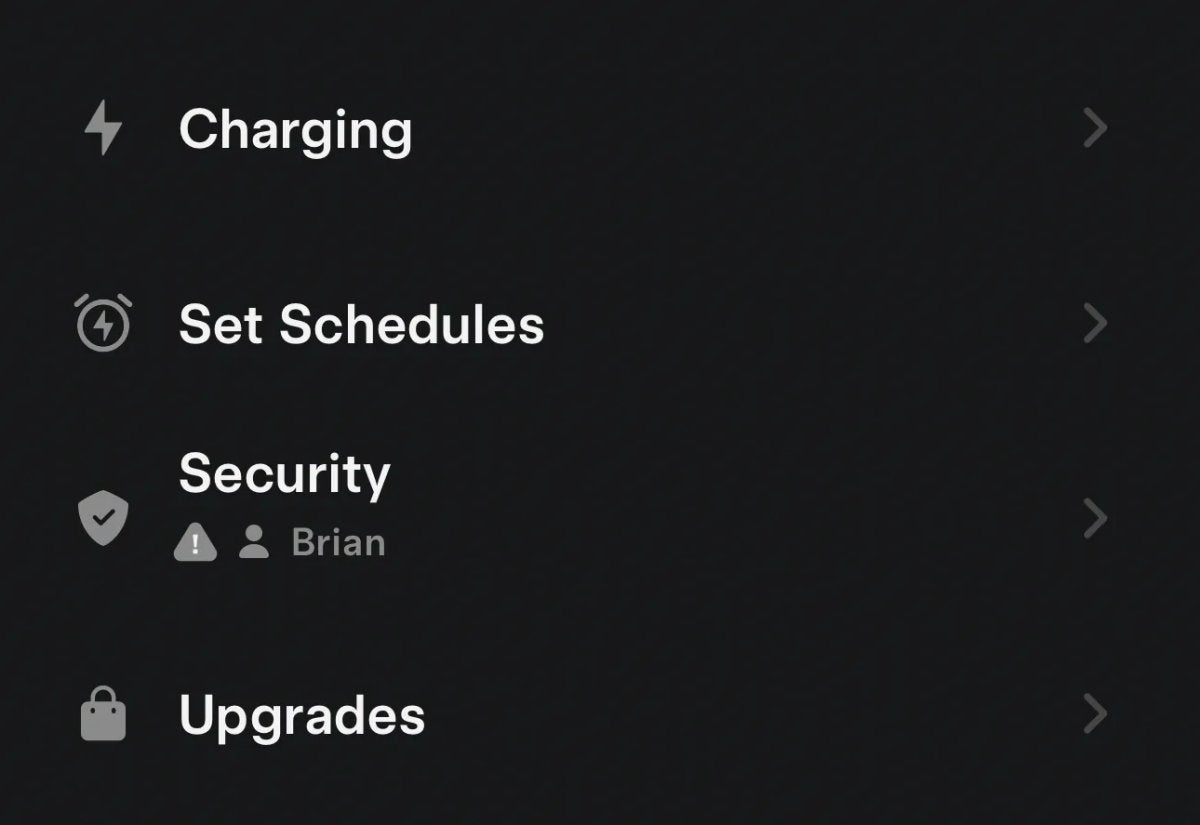
Tesla Update 2026.8 Lets You See Who's Driving in the Tesla App

Tesla is rolling out software update version 2026.8. Alongside features such as Comfort Braking for the refreshed Model Y, there is an additional unlisted change: the Tesla app now shows which driver profile is currently active in the car.
Within the app, under Security & Drivers, you can see the vehicle's selected driver profile. This helps households with multiple drivers quickly identify who is using the car.
How the New Feature Works
You can view the active profile in real time. While the car is being driven, the app shows the name of the profile in use. When the vehicle is parked and asleep, it displays the profile of the last user.
This is useful for shared vehicles in families or businesses. Although a driver can switch profiles unless a PIN is set, the feature typically provides a reliable indication of who has the car.
Supported Vehicles
The feature is available across the full lineup, including legacy Model S and Model X, as long as the vehicle is on 2026.8 and the mobile app is up to date.
Understanding Tesla Driver Profiles
Driver profiles let multiple users store preferences such as seat, mirror, and steering wheel positions. Profiles are often linked to particular phone keys or key fobs, so the car adjusts automatically when you unlock it.
Profiles also sync navigation recents, favorites, and media settings across any Tesla you use. This is part of the "Tesla Profile" system, which cloud-syncs your data to every supported vehicle on your account. There are also restricted driver profiles intended to help parents monitor and limit features for teen drivers.
More Than Just Visibility
This new visibility in the app isn't just about "spying" on your spouse; it's about convenience. If you see the prior driver's profile is still active, you'll know the seat will be set to their position before you get in. It also helps confirm that a restricted profile is in use when required.
As 2026.8 rolls out, the active driver profile should appear in the app's Security section.
















Share:
Robotaxi app updates: Android app hints and address features
Tesla Cybercab Gets New Charge Port, Wheelchair-Height Seats