
Update 26.34 bringt intelligentes Laden für Powerwall und Wall Connector der 3. Generation
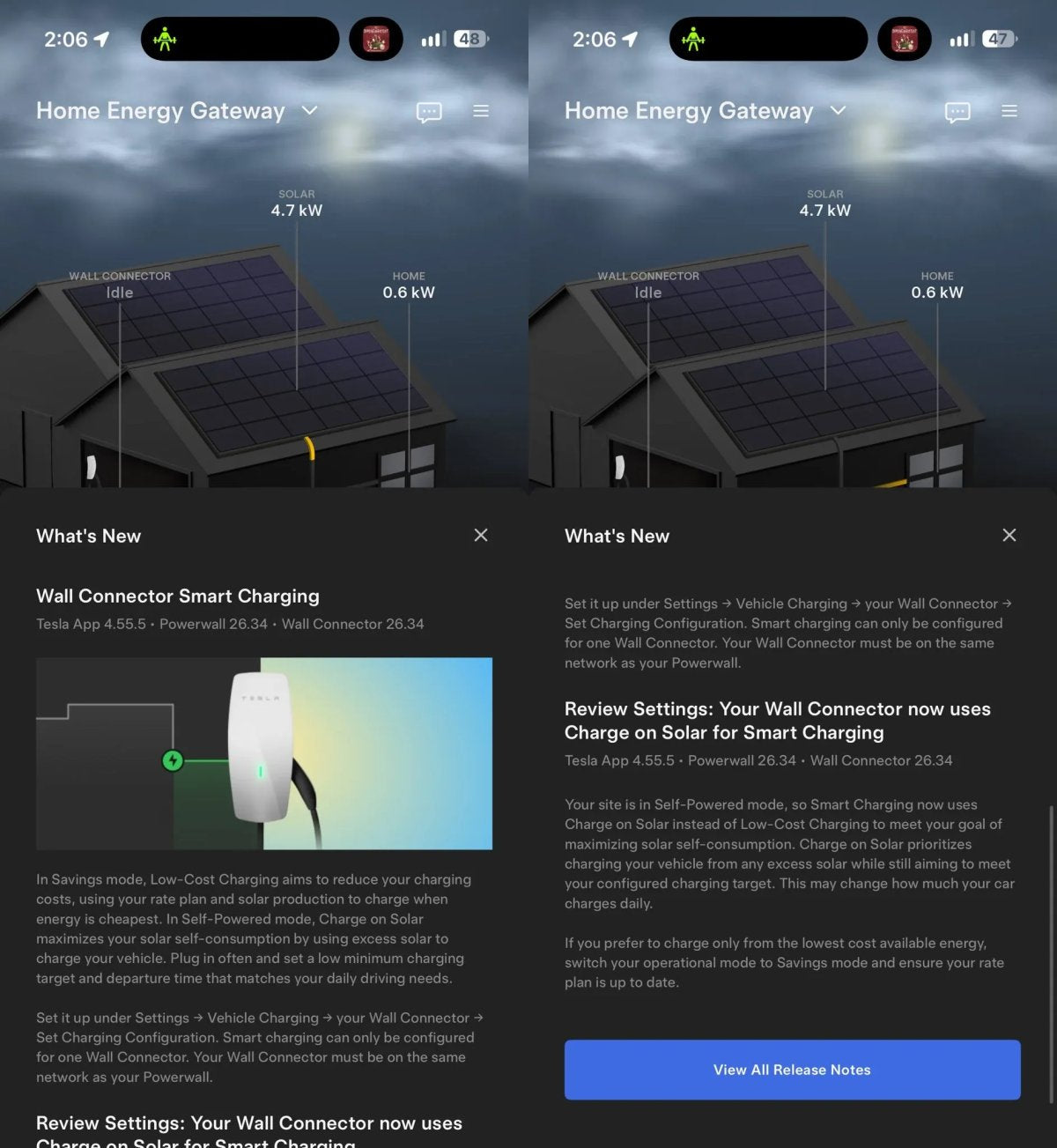
Das Software-Update 26.34 erweitert die Powerwall und den Wall Connector der 3. Generation um Funktionen für intelligentes Laden. Tesla-Besitzer @EVStraya machte auf X auf diese Änderung aufmerksam und merkte an, dass der „Wall Connector nun ‚Laden mit Solarstrom‘ für intelligentes Laden nutzen kann.“
Diese Funktionen tauchten erstmals im Mai in Form von Textfragmenten in der Tesla-App auf, die auf einen neuen kostengünstigen Lademodus für Wall Connectors und eine verbesserte „Laden mit Solarstrom“-Option für Powerwall-Besitzer hinwiesen. Die Einführung ist nun offiziell und unterstützt auch ältere Powerwall 2-Systeme. In einem Beispiel verbindet das Setup von @EVStraya drei Powerwall 2-Einheiten mit einem Wall Connector der 3. Generation.

So funktioniert das intelligente Laden mit dem Wall Connector
Intelligentes Laden koppelt Ihren Wall Connector mit Ihrer Powerwall, wobei sich das Ladeverhalten nach dem Betriebsmodus richtet, der auf der Powerwall eingestellt ist.
Im Modus „Strom sparen“ nutzt das kostengünstige Laden Ihren Stromtarif und die Solarproduktion, um das Fahrzeug dann zu laden, wenn die Energie am günstigsten ist. Dies kann besonders bei zeitabhängigen Tarifen mit günstigeren Nachtstrompreisen nützlich sein.

Im Modus „Eigenverbrauch“ leitet „Laden mit Solarstrom“ überschüssige Solarenergie an das Fahrzeug weiter, wodurch mehr der selbst erzeugten Energie im Haushalt verbleibt. Das System steuert weiterhin Ihr konfiguriertes Ladeziel an, obwohl Tesla darauf hinweist, dass dies „die tägliche Ladeleistung Ihres Autos verändern kann.“
Wenn Ihr System bereits auf „Eigenverbrauch“ eingestellt ist, stellt das Update das intelligente Laden des Wall Connectors automatisch auf „Laden mit Solarstrom“ um. Um stattdessen die günstigste Energie zu priorisieren, wechseln Sie in den Modus „Strom sparen“ und stellen Sie sicher, dass Ihr Stromtarif aktuell ist.
So richten Sie intelligentes Laden ein
Gehen Sie in der Tesla-App auf Einstellungen > Fahrzeugladen > Wall Connector > Ladekonfiguration einstellen. Voraussetzung ist, dass sich der Wall Connector im selben WLAN-Netzwerk wie die Powerwall befindet und pro System nur ein Wall Connector für intelligentes Laden konfiguriert werden kann.

Tesla empfiehlt außerdem, das Fahrzeug häufig anzuschließen und „ein niedriges Mindestladeziel sowie eine Abfahrtszeit festzulegen, die Ihren täglichen Fahrbedürfnissen entspricht.“ Dies gibt dem System die Flexibilität, auf günstigere Energie oder verfügbaren Solarstrom zu warten, ohne dass Sie mit zu geringer Reichweite dastehen.
Intelligentes Laden baut auf bestehenden Wall-Connector-Funktionen auf, wie z. B. der VIN-basierten Zugriffskontrolle und integrierten Ladeplänen. Im Bereich der Energieversorgung für Privathaushalte hat Tesla vor Kurzem das Powershare Home Backup für das Model 3 und Model Y eingeführt, das es diesen Fahrzeugen ermöglicht, bei einem Stromausfall ein Haus mit Strom zu versorgen – genau wie den Cybertruck. Während die Firmware 26.34 bei immer mehr Powerwall-Besitzern ankommt, wird erwartet, dass diese intelligenten Ladefunktionen Teil des täglichen Energiemanagements zu Hause werden.
















Teilen:
Tesla App 4.61.6 fügt gruselige Stimme und Wächter-Modus-Filter hinzu
Tesla bezeichnet „Original Summon“ auf europäischen Seiten als „Dumb Summon“