
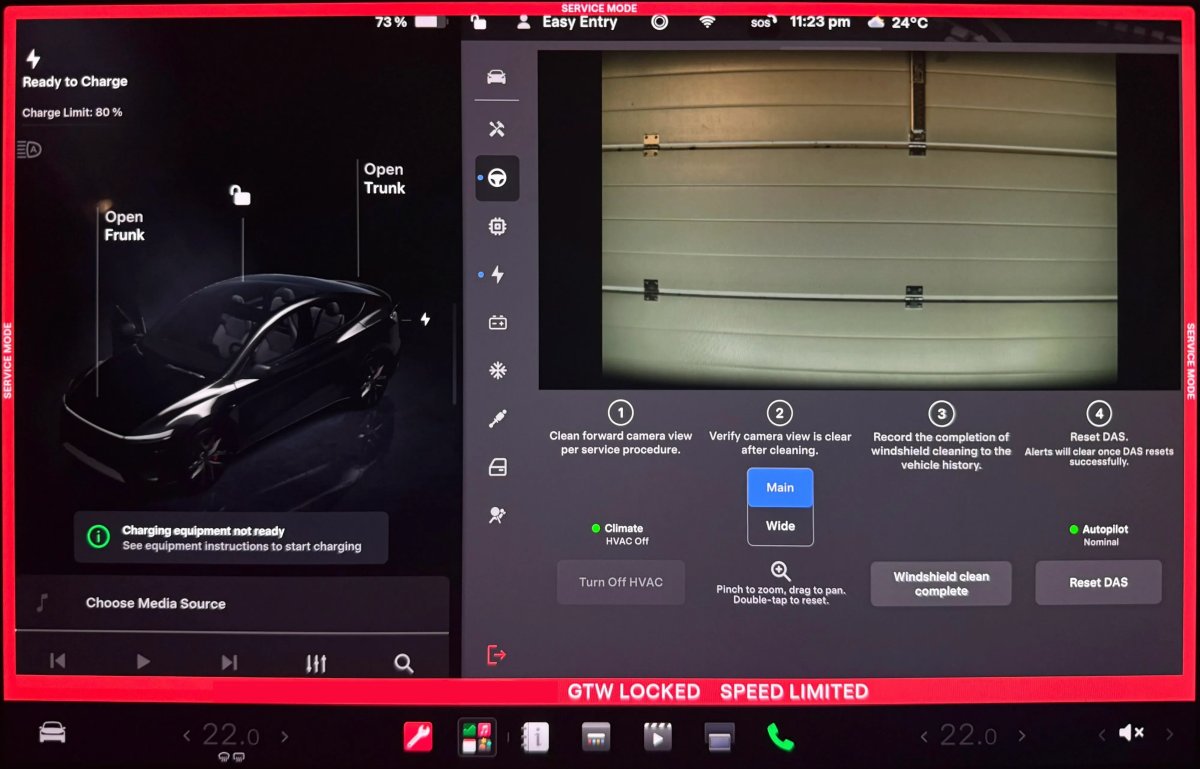

Tesla has introduced a new tool in Service Mode for technicians to address a long-standing annoyance for owners. Spotted by Tesla enthusiast @maxbrco, the latest software rollout adds a dedicated Forward Camera View Cleaning Panel to Service Mode.
This backend addition arrives with software version 2026.20. While the firmware update also includes consumer-facing enhancements such as dashcam clip encryption and new parental controls, the Service Mode changes are aimed at technicians and service professionals.
Resolving Windshield Camera Haze
Many Tesla owners have received vehicle alerts that front camera visibility is limited, even when the windshield is clean. The underlying cause is a thin, hazy film that gradually forms on the inside of the windshield within the front-facing camera housing, created by the natural off-gassing of plastics and interior cabin materials over time.
The issue has been documented in official service materials for years and is especially prevalent on newer vehicles. Cleaning this area is inconvenient because it requires removing the rear-view mirror and opening the front camera housing enclosure. Tesla previously offered precision camera cleaning for free via a specific vehicle alert, but it has since become a paid service that costs between $50 and $89 in the U.S., depending on the vehicle.
Elon Musk previously noted that Tesla was actively looking to simplify front camera cleaning. Earlier this year, the Model Y assembly line switched to a new camera housing design that appears intended to mitigate internal off-gassing buildup.
The new Service Mode feature guides technicians through the process step by step. The interface provides a live camera stream with main and wide view options, and supports panning and pinch-to-zoom. The tool outlines four actions: clean the camera view per service procedures, verify the feed is clear, log completion in the vehicle's history, and reset the Driver Assistance System (DAS). According to the release notes, it is supported on Model 3, Model Y, newer (2021+) Model S/X units with AI4 hardware, and Cybertruck.

Drive Unit Panel Update
The update also expands diagnostic capabilities in Service Mode Plus. Under the High Voltage menu, Tesla added interactive signal chart pop-ups to the Drive Unit panel.
Technicians can tap any signal with a chart icon to open a draggable, resizable pop-up window, enabling real-time signal monitoring during diagnostics on Model 3, Model Y, Cybertruck, and newer (2021+) Model S and Model X vehicles.
These changes are intended to streamline diagnostics and targeted hardware maintenance for service teams.
















Teilen:
Tesla Model 3 Plunges 300 Feet Off Cliff, Passengers Survive
Tesla Launches Official Retractable Sunshade for the Model Y