
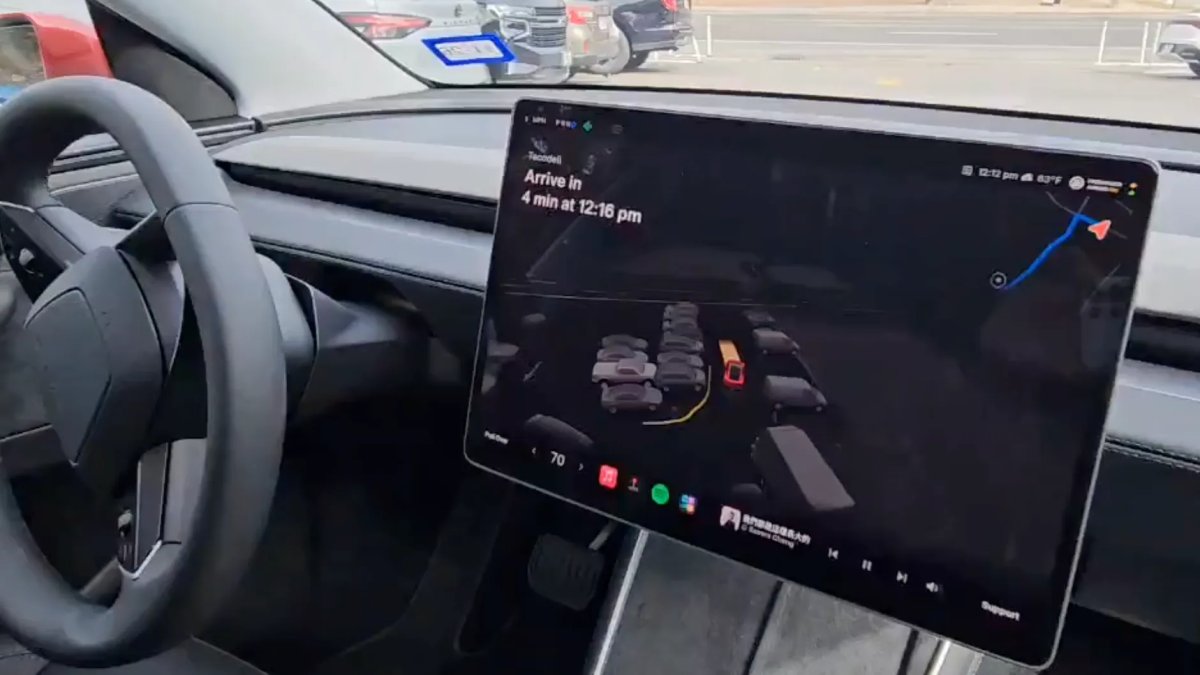
Tesla Robotaxi UI — what happens if a passenger touches the steering wheel

@Tsla99T
With the launch of unsupervised Robotaxi rides in Austin, early passengers are finding that the front-seat controls do not behave the same way they do in a consumer car. Because the Model Ys used as Robotaxis still retain physical controls (unlike the upcoming steering-wheel-free Cybercab), Tesla has implemented a software lockout designed to prevent passengers from hijacking the ride or becoming unruly.
In passenger seat now pic.twitter.com/rjfkos2ZCe
— TSLA99T (@Tsla99T) January 22, 2026
For the first time in a Tesla with FSD active, the steering wheel rejects control input, and the vehicle does not disengage FSD.
If a passenger reaches over and tugs on the steering wheel while the car is in motion, the vehicle ignores the input. A red exclamation warning — similarly sized to the small warnings in your own Tesla — pops up and says, “Do not touch the steering wheel. If action continues, the vehicle will pull over.”
Because the steering wheel in the Model Y is still connected using physical linkages rather than steer-by-wire like in the Cybertruck, passengers must keep their hands to themselves.
This behavior indicates that, although it isn’t currently accessible, Tesla may be considering allowing passengers to occupy the driver’s seat as well. The car acts as the captain; the humans are along for the ride.
The ability to change the vehicle’s behavior when the steering wheel is moved also suggests that Tesla could implement NVIDIA’s cooperative steering feature if it chose to.
Robotaxi User Interface
Because there is no driver to monitor speed or range, the central display has been adjusted with passengers in mind. The traditional driver-focused layout, where the left third of the screen is dedicated to driving information, has been replaced by a Robotaxi layout.
The speedometer, gear selector, and turn signal indicators — normally prominent — have been reduced in size and tucked into the top-left corner of the display. They remain visible for reference rather than for vehicle operation.
The media and navigation boxes that previously appeared alongside the safety monitor are no longer present, opening the visualization further.
The dock has been redesigned, with app icons, media controls, and other buttons placed in the bottom row. The app icons shown are Apple Music, Tesla Arcade, Spotify, and what appears to be a new All Apps icon.
The media controls are significantly larger. Tesla appears to assume riders will be more interested in changing the song, selecting their next show, or checking their ETA than in monitoring the car’s current driving status.
Two large buttons anchor the bottom corners of the screen. On the left, a Pull Over button lets passengers safely end the ride at the nearest safe location; on the right, a Support button connects the rider to Tesla’s remote operations center at Giga Texas for assistance.
The Bridge to Cybercab
This software interface serves as a bridge between the current Model Y and the dedicated Cybercab. By locking out the controls and shifting the UI focus, Tesla is effectively previewing what its end-goal UI will look like for both Cybercab and Unsupervised FSD in consumer cars.




Condividi:
Tesla's Earnings Call Today: Time of Event and How to Listen Live
Everything Tesla Announced During Its Earnings Call: Model S/X Discontinued, Next Robotaxi Locations