
Esta versión añade FSD v14.3.6 para HW4 y FSD 14 Lite para HW3.
FSD (Supervisado) v14.3.6
Disponibilidad: HW4. Modelos: S, 3, X, Y, CT.
Cambios en esta versión:
- Se ha mejorado la etapa de Aprendizaje por Refuerzo (RL) del entrenamiento de la red neuronal FSD, mejorando el rendimiento en una amplia variedad de escenarios de conducción.
- Se ha mejorado el codificador de visión de la red neuronal para manejar mejor situaciones raras y de baja visibilidad, fortalecer la comprensión de la geometría 3D y ampliar la comprensión de las señales de tráfico.
- Se han reescrito el compilador de IA y el tiempo de ejecución desde cero con MLIR, lo que resulta en un tiempo de reacción un 20% más rápido y mejora la velocidad de iteración del modelo.
- Se ha mitigado el sesgo innecesario de carril y comportamientos menores de seguimiento cercano (tailgating).
- Se ha aumentado la decisión al seleccionar y maniobrar hacia espacios de estacionamiento.
- Se ha mejorado la predicción del pin de ubicación de estacionamiento, que ahora se muestra en un mapa con un icono de P.
- Se ha mejorado la respuesta ante vehículos de emergencia, autobuses escolares, infractores del derecho de paso y otros vehículos poco comunes.
- Se ha mejorado el manejo de animales pequeños centrando el entrenamiento de RL en ejemplos más difíciles y añadiendo recompensas para una mejor seguridad proactiva.
- Se ha mejorado el manejo de los semáforos en intersecciones complejas con luces compuestas, carreteras curvas y paradas ante luces amarillas, gracias al entrenamiento con ejemplos difíciles de RL obtenidos de la flota de Tesla.
- Se ha mejorado el manejo de objetos raros e inusuales que se extienden, cuelgan o se inclinan hacia la trayectoria del vehículo obteniendo eventos poco frecuentes de la flota.
- Se ha mejorado el manejo de degradaciones temporales del sistema manteniendo el control y recuperándose automáticamente sin intervención del conductor, reduciendo desconexiones innecesarias.
- Se ha unificado el modelo entre Actually Smart Summon, FSD y Robotaxi para un comportamiento más capaz y confiable. (Nuevo en FSD v14.3.2 para vehículos que no son Cybertruck, nuevo en FSD v14.3.4 para Cybertruck)
- Ayuda a Tesla a mejorar la Conducción Autónoma seleccionando un motivo de intervención en la pantalla principal después de tomar el control. (Nuevo en FSD v14.3.2)
- Se ha mejorado la sensibilidad del sistema de monitoreo del conductor con un mejor seguimiento de la mirada, manejo de gafas y mayor precisión en condiciones de iluminación variable.
- La velocidad máxima de Actually Smart Summon ha aumentado a 8 mph (13 km/h). (Añadido en FSD v14.3.3, no disponible en Cybertruck)
- Ahora puedes ver la distancia recorrida en FSD (Supervisado) sin intervenciones. La aplicación de Conducción Autónoma también mostrará tu racha más larga sin intervenciones. (Añadido en FSD v14.3.3)
- Las opciones de estacionamiento ahora aparecen en el mapa al llegar a tu destino. (Añadido en FSD v14.3.4)
Mejoras futuras
- Ampliar el razonamiento a todos los comportamientos más allá del manejo del destino.
- Añadir evitación de baches.
Actually Smart Summon
Actually Smart Summon (ASS) y Dumb Summon ya están disponibles para Cybertruck.
FSD (Supervisado) v14 Lite
Disponibilidad: HW3. Modelos: 3, Y.
- Se ha destilado la inteligencia del HW4 V14 al HW3, permitiendo que el HW3 aprenda a manejar escenarios usando el HW4 V14 como guía. Esto desbloquea las mejoras realizadas en el HW4, incluyendo el Aprendizaje por Refuerzo (RL) y los modelos offline, para el HW3.
- Se ha mejorado la capacidad de respuesta tanto proactiva como reactiva en el manejo de la navegación, incorporaciones y bifurcaciones, interacciones con peatones, semáforos y escenarios de vehículos que se cruzan.
- Se ha mejorado la comodidad general mediante menos ralentizaciones falsas, una dirección más suave y un centrado de carril más consistente.
- Se han introducido capacidades de estacionamiento, salida de estacionamiento y marcha atrás.
- Se han añadido Opciones de Llegada para elegir dónde debe detenerse o estacionar el FSD: en un estacionamiento, en la calle o en una entrada privada.
- Los Perfiles de Velocidad ya están disponibles en todo momento para adaptar aún más el estilo de conducción.
Aplicación de Conducción Autónoma
Disponibilidad: HW3. Modelos: 3, Y.
Utiliza la nueva aplicación de Conducción Autónoma para suscribirte con un solo toque, aprender cómo activar y usar la función y ver estadísticas continuas. Para abrirla, ve al Lanzador de Aplicaciones > Conducción Autónoma.
Conducción Autónoma Total (Supervisada)
Disponibilidad: HW4. Modelos: S, 3, X, Y, CT.
Bajo tu supervisión, la Conducción Autónoma Total (Supervisada) puede comenzar desde una posición estacionada, realizar cambios de carril, seleccionar bifurcaciones para seguir tu ruta de navegación, rodear otros vehículos y objetos, realizar giros a la izquierda y derecha, y estacionar en tu destino. Tú y cualquier persona a quien autorices deben extremar la precaución y permanecer atentos. No convierte a tu vehículo en autónomo.
La Conducción Autónoma Total (Supervisada) está habilitada en tu vehículo. Para usarla, presiona el botón Iniciar Conducción Autónoma en la interfaz de usuario, o presiona el botón de la rueda de desplazamiento derecha una vez. Puedes desactivar la Conducción Autónoma Total (Supervisada) en la Configuración de Piloto Automático.
Iniciar Conducción Autónoma desde estacionado
Disponibilidad: HW3. Modelos: 3, Y.
Aparece un botón en la pantalla cuando se cumplen los requisitos del conductor. Los requisitos del conductor incluyen (pero no se limitan a):
- El conductor está sentado en el asiento del conductor
- El conductor tiene el cinturón de seguridad abrochado
- La cámara del habitáculo no está obstruida
La confirmación de freno requiere que el conductor presione y suelte el pedal del freno antes de que se pueda activar el FSD (Supervisado). Cuando la confirmación de freno está desactivada, al presionar el botón, la Conducción Autónoma aplicará los frenos y activará el FSD (Supervisado). Si no se cumplen los requisitos de detección del conductor o si el FSD (Supervisado) no detecta a un conductor, se le solicitará que presione y suelte el pedal del freno para confirmar. Puedes habilitar la confirmación de freno en Conducción Autónoma > Confirmación de freno.
Esta función no convierte a tu vehículo en autónomo y debes permanecer atento y listo para tomar el control en cualquier momento. Solo un conductor con licencia autorizado para operar el vehículo debe tener acceso a la posición del asiento del conductor en cualquier momento en que el vehículo no esté en modo Teatro o Arcade.
Opciones de Llegada
Disponibilidad: HW3. Modelos: 3, Y.
- Selecciona una opción de llegada como Estacionamiento, Calle, Entrada Privada o Detenerse para bajadas al estilo Robotaxi.
- Tus preferencias para las opciones de llegada y las posiciones de estacionamiento preferidas se guardan para cada destino.
Perfiles de Velocidad
Disponibilidad: HW3. Modelos: 3, Y.
El FSD (Supervisado) ahora determina la velocidad adecuada basándose en una combinación del perfil del conductor, el límite de velocidad y el tráfico circundante.
- Se ha introducido el nuevo Perfil de Velocidad SLOTH, que utiliza velocidades más bajas y una selección de carril más conservadora que CHILL.
- El perfil del conductor ahora tiene un impacto mayor en el comportamiento; cuanto más asertivo sea el perfil, mayor será la velocidad máxima.
- La rueda de desplazamiento derecha ahora ajusta la configuración del Perfil de Velocidad en lugar de un desplazamiento preciso de velocidad máxima en mph/kph.
Mejoras en la interfaz de usuario
Disponibilidad: HW3. Modelos: 3, Y.
Ajusta configuraciones como el Perfil de Velocidad y las Opciones de Llegada directamente desde la visualización de Conducción Autónoma en la pantalla central.
Vista previa de la cámara
Disponibilidad: Disponible en todo el mundo; HW4. Modelos: S (Nuevo), 3, X (Nuevo), Y, CT.
Ahora puedes abrir la Vista previa de la cámara en cualquier momento, incluso si el vehículo no está en Estacionamiento. Ve a Controles > Servicio > Vista previa de la cámara y toca cualquier vista de cámara para verla individualmente. Toca el botón de cuadrícula para volver a todas las cámaras.
Advertencia de punto ciego mientras está estacionado
Disponibilidad: Disponible en todo el mundo. Modelos: S (Nuevo), X (Nuevo), Y (Nuevo).
Si intentas abrir una puerta mientras se detecta un objeto que se aproxima en tu punto ciego (por ejemplo, un ciclista que se acerca por detrás), suena un timbre y la puerta no se abrirá al presionar el botón inicialmente. Espera un momento y presiona el botón por segunda vez para anular la advertencia.
Cifrado de clips de Dashcam
Disponibilidad: Disponible en todo el mundo; requiere Ryzen. Modelos: S (Nuevo), 3, X (Nuevo), Y, CT.
Los clips de Dashcam ahora están cifrados por privacidad cuando se guardan en tu unidad flash USB. Solo tu vehículo puede verlos. Para descifrar los clips, toca el icono del candado en la aplicación Dashcam o visita dashcam.tesla.com. Para desactivar el cifrado, ve a Controles > Seguridad > Cifrar grabaciones de Dashcam.
Controles parentales
Disponibilidad: Disponible en todo el mundo. Modelos: S (Nuevo), 3, X (Nuevo), Y, CT.
Puedes bloquear el navegador, Teatro y Arcade yendo a Controles > Seguridad > Controles parentales mientras estás en Estacionamiento.
"Hey Grok"
Disponibilidad: Modelos: S (Nuevo), 3, X, Y, CT.
Ahora puedes hablar con Grok, un asistente inteligente creado por xAI. Para iniciar Grok, ve al Lanzador de Aplicaciones > Grok, mantén presionado el botón de voz en tu volante o di "Hey Grok". Habilita "Hey Grok" en Grok > Configuración. Di "adiós" para cerrar.
Puedes elegir la voz y la personalidad de Grok, desde Cuentacuentos hasta Desquiciado. Configura la personalidad de Grok en Asistente para que añada y edite destinos de navegación, convirtiéndose en tu guía personal. También puedes establecer recordatorios basados en la ubicación, como "recuérdame comprar leche cuando esté cerca de casa". Habilita los recordatorios basados en la ubicación en Grok > Configuración.
Requiere Conectividad Premium o una conexión WiFi. Las conversaciones son anónimas para Tesla y no están asociadas a tu vehículo.
Nota: Grok se encuentra actualmente en versión Beta inicial y no admite comandos de voz para controles del coche que no sean navegación. Los comandos de voz existentes permanecen sin cambios. "Hey Grok" está entrenado en inglés estadounidense.
Mejoras de seguridad
Disponibilidad: Disponible en todo el mundo. Modelos: S, 3, X, Y, CT.
Esta actualización incluye importantes correcciones y mejoras de seguridad.
Mejoras del modo de servicio
Disponibilidad: Disponible en todo el mundo.

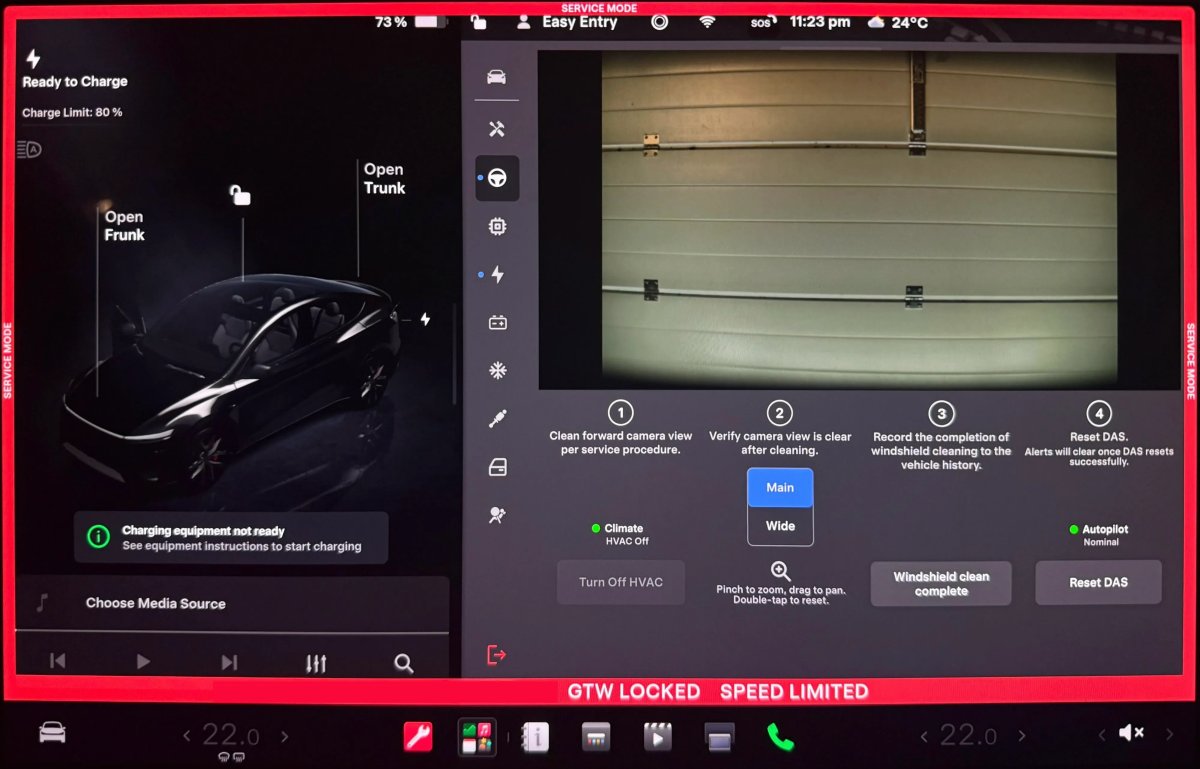
Panel de limpieza de la vista de la cámara frontal
Un nuevo panel de Limpieza de la Vista de la Cámara Frontal está disponible en Asistencia al Conductor para facilitar la limpieza de la superficie del parabrisas frente a las cámaras. El panel muestra una transmisión de cámara en vivo con la capacidad de hacer zoom en la imagen.
Modelos: Model 3, Model Y, Model S (2021+), Model X (2021+) con DAS AI4 y Cybertruck.
Actualización del panel de la unidad de accionamiento - Ventanas emergentes de gráficos de señales (Modo Servicio Plus)
El panel de la unidad de accionamiento ahora admite ventanas emergentes interactivas de gráficos de señales. Las señales con un icono de gráfico se pueden tocar para abrir una ventana emergente arrastrable y redimensionable para el monitoreo de señales en tiempo real.
Modelos: Model 3, Model Y, Model S (2021+), Model X (2021+), Cybertruck.
















Compartir:
Tesla está expandiendo Grok a toda Europa y a más partes de Asia
Tesla lanza una sección dedicada a la conducción autónoma en la aplicación de Tesla