
Tesla FSD v15 Drops Post-Disengagement Menu, Adds Reality View
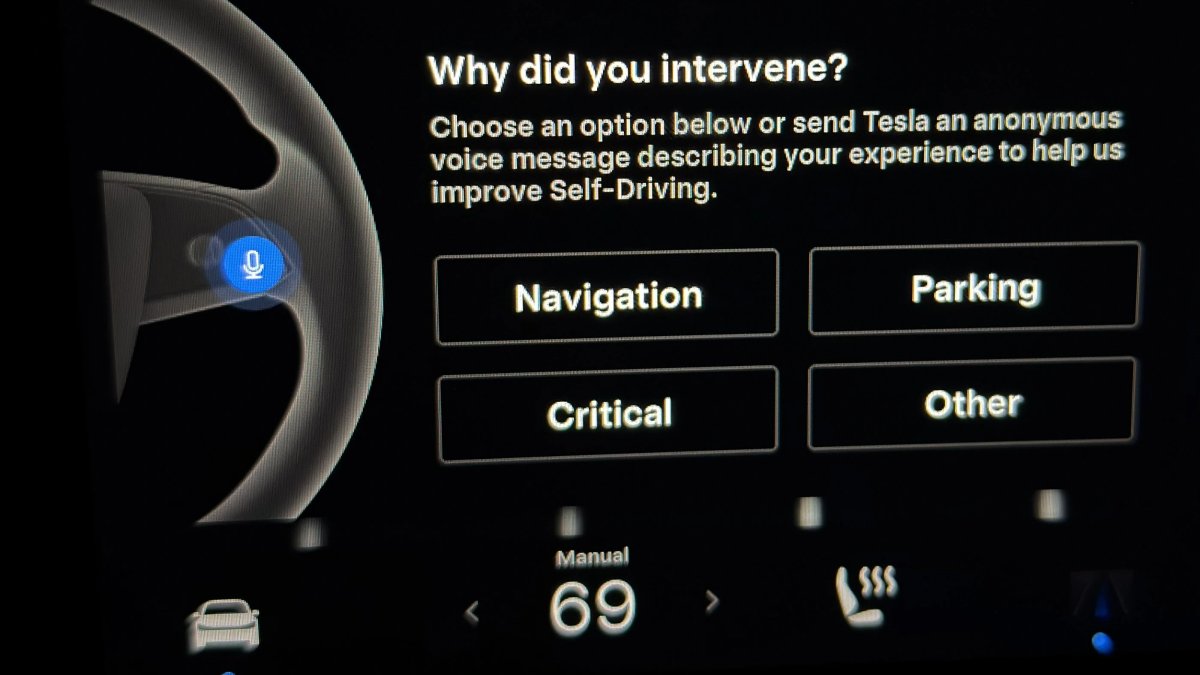
Tesla has removed one of the most persistent prompts in Full Self-Driving. With FSD v15, the disengagement menu that appeared whenever a driver took control from FSD (Supervised) is gone.
Previously, each takeover required selecting a reason—Navigation, Parking, Critical, or Other. In software update 2026.38.6.11, disengaging FSD no longer shows anything on the display.

A Menu Nobody Asked For
The disengagement menu first arrived with FSD v14.3.2 in April, prompting drivers to choose a reason after an intervention. It offered no close button and stayed visible until a selection was made.
Weeks later, Tesla reduced its size to be less intrusive so it no longer covered the navigation route, while leaving climate, media, and other controls accessible. Subsequent updates also rearranged the available options.
Owners briefly bypassed the prompt by double‑tapping the steering wheel’s mic button to record an empty voice note, which dismissed the menu immediately. In June, Tesla disabled that workaround by requiring drivers to wait at least three seconds before ending a voice memo, making a category selection the faster path.

What Else Is in FSD v15
The removal of the menu is not listed in Tesla’s official release notes, and FSD v15 brings several other changes. The headline addition is Reality View, an AI-generated 3D visualization of the vehicle’s surroundings. Tesla also claims a 25x improvement in handling safety-critical scenarios. Additional features include Speed Camera Slowdown, Bike Rack Mode, Calm Mode for fewer on-screen distractions, and improvements to parking spot selection.
Wider Release Next Month
Tesla has not explained the change. Voice notes remain available for drivers who wish to report an issue. FSD v15 is currently limited to a small number of newer vehicles, and Elon Musk said it’s coming to more owners with the Holiday Update next month.

Teilen:
Tesla’s AI4.5 FSD Gets 48GB RAM, LPDDR5X; Production Mid-2027
Tesla FSD v15 Reality View: How It’s Built and What It Shows [VIDEO]