
Tesla FSD v15 Adds Full-Screen Maps and a Minimal Calm Mode

Tesla FSD v15 gives drivers alternatives to Reality View: a full-screen navigation map that hides the FSD visualization and a minimal Calm Mode. Owners have requested these options.
Neither feature appears in Tesla’s official release notes, but both are shown in its FSD v15 promotional video and documented in independently compiled release notes for software update 2026.38.6.11.
Full-Screen Map
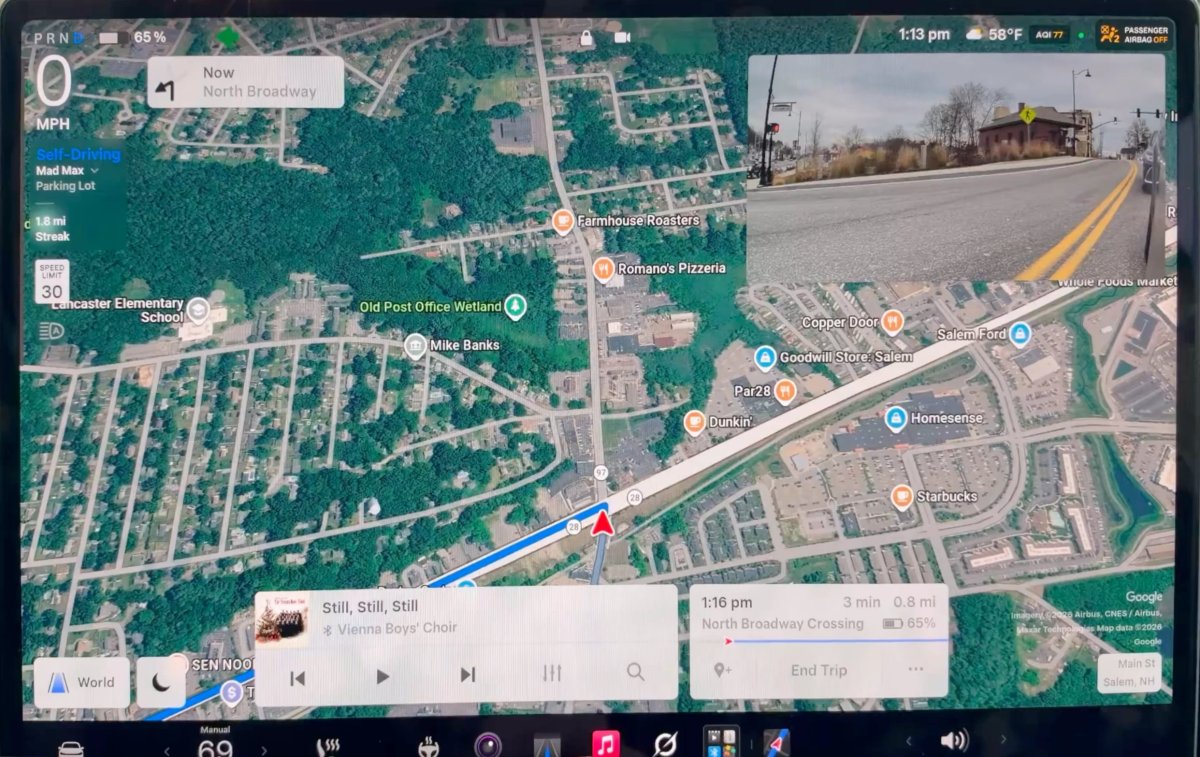
Drivers can replace the FSD visualization with a map that fills the center screen. The arrangement resembles that of the Model S and Model X, which display FSD visuals on the driver display and leave the center screen available for the map. Owners of other models have wanted this for years.

The map shows the route in 3D, nearby buildings and suggested parking lots near the destination. Buttons at the bottom left switch between the full-screen map, Reality View and Calm Mode.
As Sawyer Merritt noted, opening an app while the map is full screen shifts the map smoothly to the left, keeping the current location centered and the route unobstructed. Model S and Model X owners have had this behavior for some time.
Calm Mode
Calm Mode hides both the map and the FSD visualization, leaving information such as speed, speed limit, the next turn and arrival time on screen. Its simplified dock contains vehicle settings, climate controls and music.
To enter Calm Mode, swipe down from the top of the screen with three fingers. A one-finger swipe up from the bottom returns the display to Reality View or the full-screen map, as shown in a video by @01Ananto.
The mode originated in Tesla’s Robotaxi service, where it was added to commercial rides last month. Owners with FSD v15 can now use it in their own cars.
Display Options and Availability
Reality View recreates the surroundings rather than directly showing what FSD sees and responds to. The other views allow drivers to focus on the map or reduce the display to essential information.
FSD v15 remains limited to a small number of newer vehicles. Elon Musk said last week that it would reach more owners with the Holiday Update next month.


Teilen:
New York Restricts Car Feature Fees, With Tesla FSD Likely Exempt
MKBHD Pays Cybercab Deposit as Head-Shaving Bet Nears Deadline