
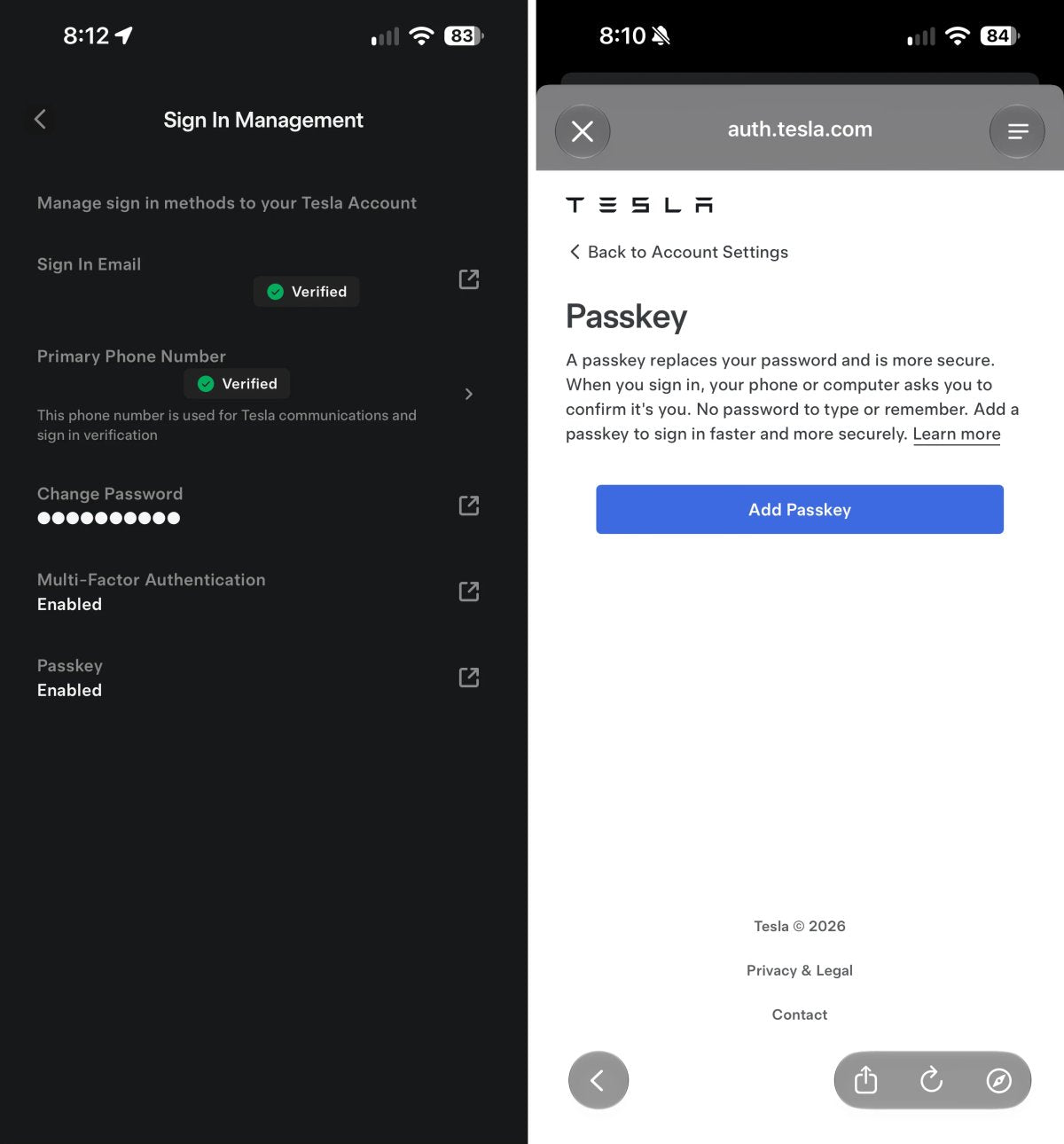
Tesla fügt Tesla-App Passkey-Unterstützung hinzu
Tesla führt eine bemerkenswerte Sicherheitsverbesserung für seine mobile App ein. Mit dem iOS-App-Update auf Version 4.61.0, das seit Freitag an die Besitzer ausgerollt wird, hat das Unternehmen eine Passkey-Unterstützung hinzugefügt, um die Anmeldung schneller und sicherer zu machen.
Die neue Funktion ermöglicht es Fahrern, anstelle von herkömmlichen Passwörtern Passkeys zu verwenden, die auf biometrischer Authentifizierung und gerätegebundenen kryptografischen Schlüsseln basieren.
Warum Passkeys wichtig sind
Ein Passkey ist ein digitaler Anmeldedaten-Satz, mit dem Sie sich per Face ID, Touch ID oder Gerätecode anmelden können, anstatt ein Passwort einzugeben. Passkeys verwenden zwei kryptografische Komponenten: einen privaten Schlüssel, der auf Ihrem Telefon gespeichert ist, und einen öffentlichen Schlüssel, der bei den Authentifizierungsservern von Tesla registriert ist.
Da kein Passwort eingegeben oder gemerkt werden muss, sind Passkeys äußerst resistent gegen Phishing und Datenlecks. Selbst wenn jemand eine gefälschte Anmeldeseite erstellt und Sie dazu verleitet, sich anmelden zu wollen, gibt Ihr Gerät den privaten Schlüssel nicht frei, da es keine gültige Anfrage von den Authentifizierungsservern von Tesla erhält. Für Besitzer macht es den Zugriff auf ein Tesla-Konto zu einer schnellen biometrischen Überprüfung.
So aktivieren Sie Passkeys in der Tesla-App
Die Einrichtung dauert in der App weniger als eine Minute:
- Öffnen Sie das Menü.
- Tippen Sie auf Ihren Profilnamen und wählen Sie Sicherheit & Datenschutz aus.
- Wählen Sie Anmeldeverwaltung.
- Tippen Sie auf Passkey, wodurch sich ein sicheres Tesla-Authentifizierungsfenster öffnet.
- Tippen Sie auf die blaue Schaltfläche Passkey hinzufügen und befolgen Sie die Anweisungen auf dem Bildschirm.

Nach der Einrichtung zeigt das Menü Anmeldeverwaltung direkt unter Ihrem Status der Zwei-Faktor-Authentifizierung an, dass Passkey aktiviert ist. Dasselbe App-Update wird auch für Android-Nutzer ausgerollt, bei denen die Passkey-Unterstützung ähnlich über die Fingerabdruck-Authentifizierung und Googles Anmeldedatenverwaltung funktionieren dürfte.
Weitere App-Upgrades in Aussicht
Passkeys sorgen für willkommene Bequemlichkeit, und größere Software-Verbesserungen könnten bald folgen. Während Passkeys den Kontozugriff schützen, könnten Funktionen der Tesla-Robotaxi-App wie die Steuerung der Belüftungsrichtung, Schieberegler für die Sitzverstellung, die Steuerung der Ambientebeleuchtung und das In-App-Browsing bei YouTube irgendwann auch ihren Weg in die Standard-Verbraucher-App finden.
Vorerst bietet die Aktivierung von Passkeys eine einfache Möglichkeit, Ihr Tesla-Konto abzusichern, ohne sich mit dem lästigen Zurücksetzen von Passwörtern herumschlagen zu müssen.
















Teilen:
Tesla FSD reduziert Kollisionen in Australien und Neuseeland um 40 %
Versionshinweise 2026.27.10