
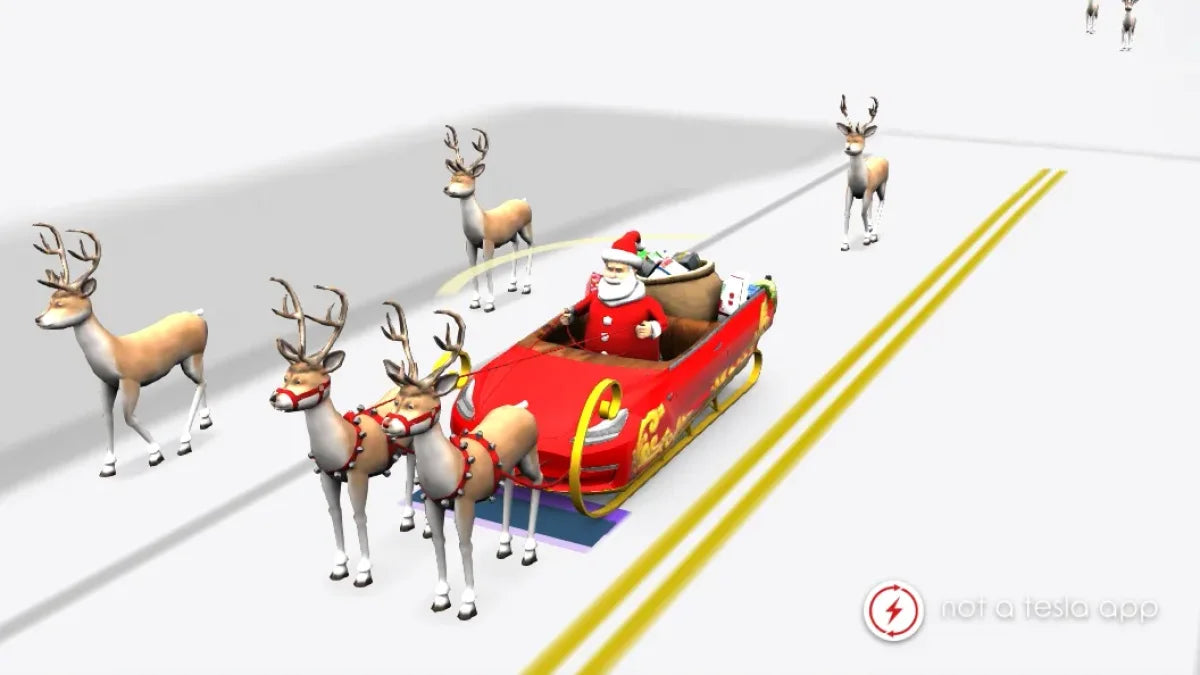
Reality View in Tesla FSD v15 Disables Santa and Halloween Modes
Tesla’s new Reality View in FSD v15 replaces the previous driving visualization with a realistic, AI-generated rendering of the environment. As a result, Santa Mode and Halloween Mode no longer alter the on-screen driving view. You can still enable either mode, but your car, nearby people, and traffic lights appear as they normally do in Reality View.
What Santa Mode and Halloween Mode Do
Both features are available in Toybox and can be activated year-round. Santa Mode turns your Tesla into a sleigh pulled by reindeer, depicts other cars as reindeer, and plays sleigh bells when you use the turn signal. Last year’s update added festive touches such as Santa Optimus behind the wheel, traffic lights topped with golden stars, and candy cane poles beneath speed limit signs.
Halloween Mode was added last month. It drapes your car in a ghost sheet, shows pedestrians as skeletons, and turns traffic lights into pumpkins, among other spooky effects.


Why Reality View Breaks Them
Previously, these modes worked by swapping one 3D model for another. Reality View instead generates the scene from camera footage, which makes it difficult to insert themed models into the visualization. The exception is your own vehicle: because the cameras cannot see the car itself, Reality View still renders it as a 3D model, so a sleigh or ghost costume could return for the car. Whether skeleton pedestrians, reindeer vehicles, and pumpkin traffic lights will return is uncertain.
Reality View Already Handles Holiday Lights
Reality View may already capture some seasonal elements on its own. In a video shared by Sawyer Merritt (@SawyerMerritt) on X, the system recreates neighborhood Christmas lights in detail as the car drives by, including lit-up trees, glowing hedges, and decorated houses.
That suggests Tesla might only need to add a festive model for the car, while Reality View can reflect decorations detected in the real world to bring holiday flair to the screen.
Intel Cars and the Holiday Update
For now, the classic versions of Santa Mode and Halloween Mode may be limited to Intel-based vehicles (to the extent they’re available there), which won’t get FSD v15 or Reality View. That could change if Tesla offers hardware upgrades like the upcoming AI4.5 chip to bring them to feature parity with newer AI4 vehicles. This year’s Holiday Update is expected next month, and Musk said last week that it will bring FSD v15 to wide release, making a Reality View–based refresh of Santa Mode a logical addition.

Teilen:
Tesla Robotaxi App Now Lets Riders Extend Wait; Scheduling Nears
Tesla App 4.63.0 Hints at In‑App Supercharger Voting