
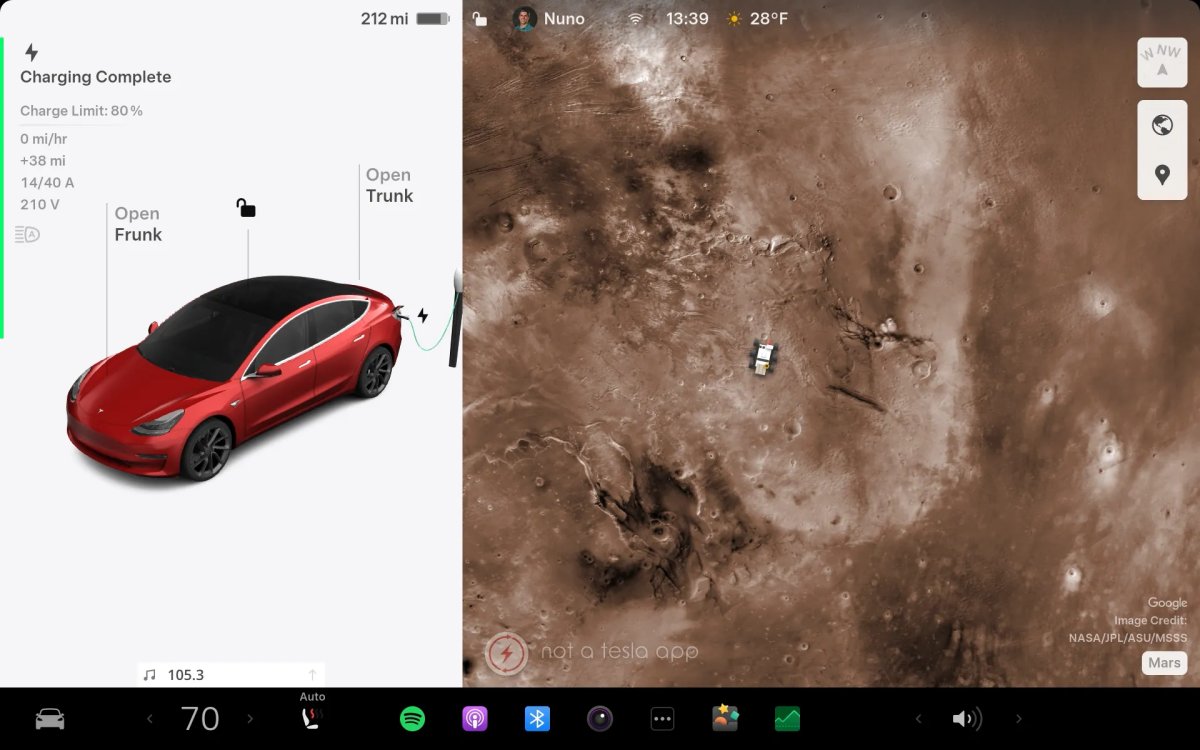

Mars Mode turns a Tesla’s navigation map into a detailed view of Mars. When it first appeared, the feature only changed the map overlay; Tesla has recently expanded the experience with several visual updates.
Below is a summary of what Mars Mode does, how to enable it, and the newest additions.
What is Mars Mode?
Mars Mode is one of Tesla’s earlier Easter Eggs. It originally required a hidden input: users would tap and hold the Tesla “T” logo that used to appear in the status bar and then enter the code “Mars.” Today it can also be enabled directly from the Toybox.
Mars Mode Features

Beyond replacing the navigation map with a Martian surface, Tesla has introduced additional visual changes tied to Mars Mode.
The recent additions include setting ambient cabin lighting to an orange hue and changing the climate airflow visuals to red on the vehicle touchscreen. On vehicles with AMD Ryzen hardware, Mars Mode also changes the parked visualization background to a Mars-themed scene.
The feature set for Mars Mode includes:
The navigation map is replaced with a high-resolution map of the Martian surface
The vehicle avatar on the map is shown as a Mars Rover
Vehicles with RGB ambient lighting set the cabin lights to a light orange
On AMD Ryzen–based vehicles, the parked visualization displays a Mars-themed background
Climate visuals on the vehicle touchscreen show red airflow even when cold air is selected
Climate visuals in the Tesla mobile app display orange airflow
Tesla previously swapped the vehicle visualization in the Software menu for a SpaceX Starship, but that change has been reverted; the Software menu now shows the usual vehicle visualization.
Cool!! pic.twitter.com/3mcTMuKCOf
— Tesla King (@TeslaKing420) October 29, 2025
How to Activate It
There are two ways to enable Mars Mode: a straightforward method and the original Easter Egg method.
Easy method: go to Apps > Toybox, find the Mars card, declare yourself an Interplanetary Species, and activate Mars Mode.
Original method: go to Controls > Software, tap and hold your vehicle’s model name until a small ripple appears, then enter the code “Mars” when prompted to enable the feature.
















Share:
Tesla Adds Zoom Feature to Dashcam Viewer [VIDEO]
Tesla Adds New Cameras to Validation Vehicles, Hinting at Future Hardware or Banish Training