
Tesla App 4.62.5: Remove Vehicle Keys, FSD Referrals, Key Reset
Tesla app version 4.62.5 introduces new options to manage vehicle access, an FSD referrals program in the United States, and a tool to reset a phone key.
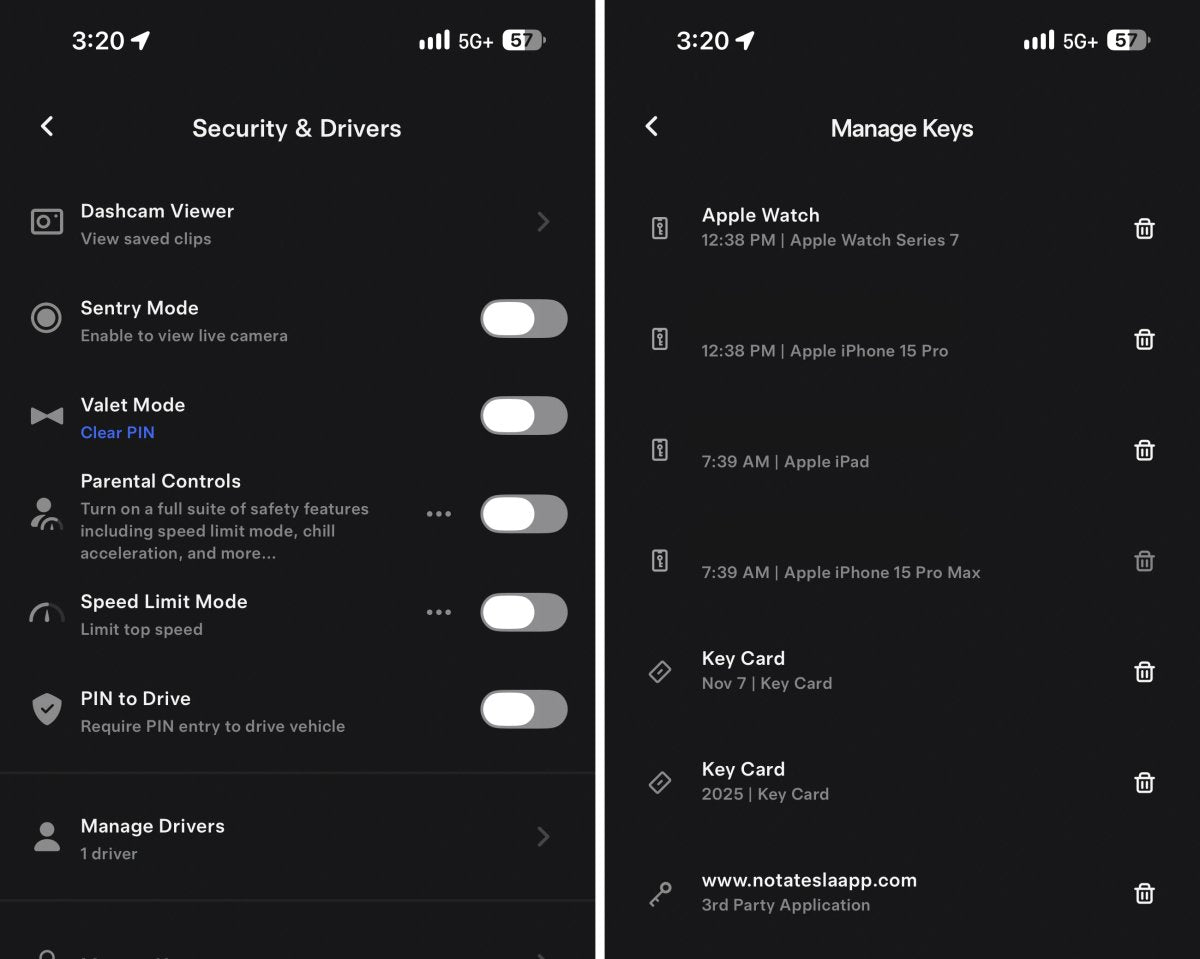
Remove Vehicle Keys From App

Under Security, a new option lets you manage vehicle keys. Vehicle keys include any device that can access your car, even if Phone Key isn’t enabled. This covers key cards, phones, other devices, and Tesla’s telemetry service used by third‑party services.
You can now delete a key directly in the Tesla app without presenting an active key card. If you’re the vehicle owner (not a shared driver) and your device is set up as a Phone Key, you can remove unused keys without additional steps.
Availability: Worldwide. Models: S, 3, X, Y, CT. Category: Undocumented.
FSD Referrals

The vehicle referral program in the United States has been replaced with FSD referrals. Owners can earn $99 per FSD referral.
Like the prior program that offered a $250 credit for Tesla services or products, this program is also capped at 12 referrals per calendar year. If you subscribe to FSD, you automatically receive a free month of FSD and can choose which vehicle it applies to. If you purchased FSD, you receive a $99 Tesla credit that can be used at the Tesla Shop, for charging, or for service.
Models: S, 3, X, Y, CT. Category: Undocumented.
Reset Phone Key

In Security under Phone Key Best Practices, you can now reset a phone key if you’re experiencing issues. You must be near the vehicle to perform the reset.
Availability: Worldwide. Models: S, 3, X, Y, CT. Category: Undocumented.










Share:
Musk: Cybertruck Profitable; Order Rate Exceeds Output, 9% Price Hike
Finland Approves Tesla Assisted Driving, 11th EU Country