
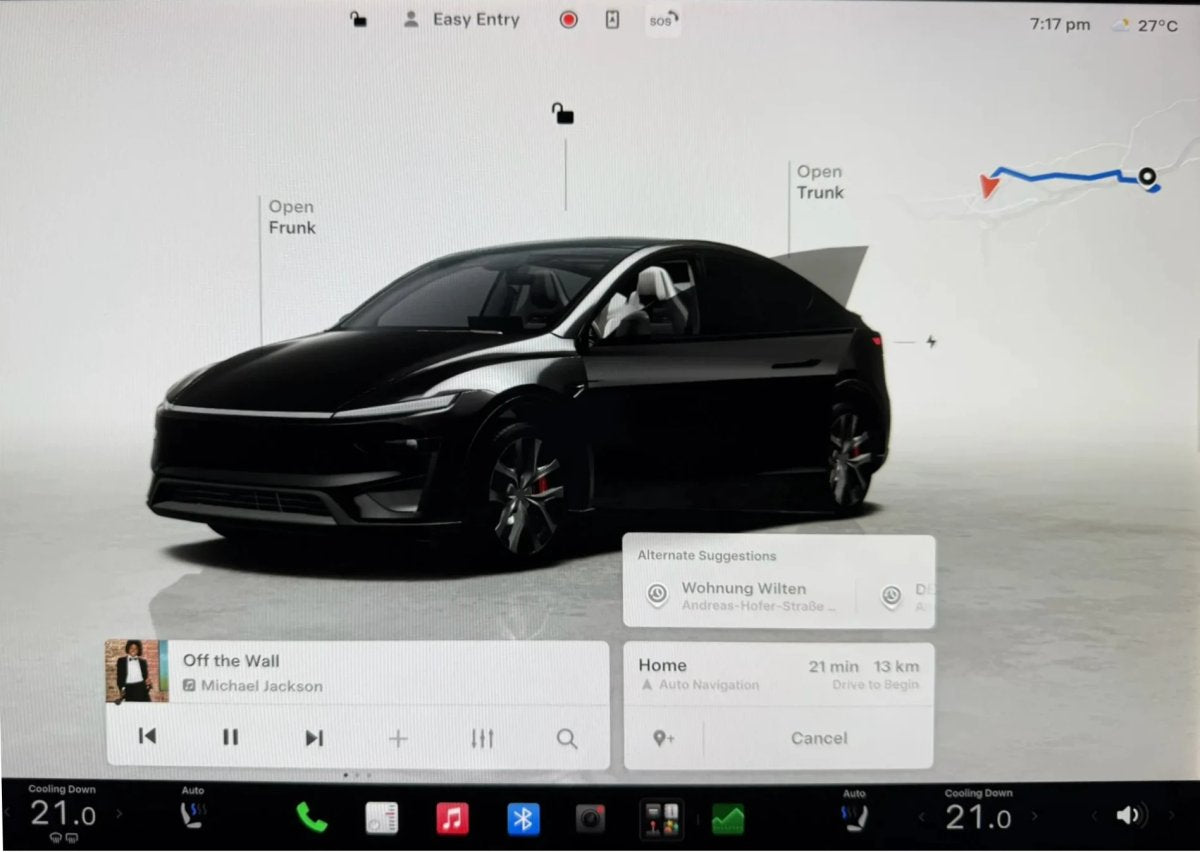
Tesla’s navigation has long offered suggested destinations, but earlier versions relied mainly on linked calendar entries and fixed schedules. With the 2026.26 Summer Update, the company has significantly upgraded Automatic Navigation to better reflect actual driving patterns.

The 2026.26 release also adds other notable features, including Grok voice controls for vehicle features and settings such as climate control, in-browser video calls, and a refreshed Caraoke app. Alongside these additions, Automatic Navigation has been refined under the hood.
Out With Rigid Schedules, In With Driving Habits
According to Tesla’s updated Owner’s Manual, earlier software paired geolocation with strict weekday time blocks. If you left home on a weekday between 5:00 AM and 11:00 AM, the system assumed you were going to work. Departing the office between 3:00 PM and 11:00 PM mapped a route back home. Drivers with schedules outside those windows, or with irregular routines, often saw less relevant suggestions.
Those fixed weekday hours have now been removed. If you depart at a time when you typically navigate to work or home, the car will automatically suggest that route.
Beyond commuting, Automatic Navigation now observes frequent trips and can recommend destinations based on the time of day, the day of the week, and your current location. For example, if you usually visit a coffee shop on Saturday mornings or go to the gym on Tuesday evenings, the vehicle learns those patterns and can surface them without needing a calendar event.
Confidence-Based Routing and Alternate Suggestions
When the software determines it has high confidence in a learned habit—based on the current time and starting point—it automatically plots a route to that destination as soon as you get in, removing the need to interact with the screen.
For context, here’s how Automatic Navigation suggestions originally appeared in 2023:

Before update 2026.26, suggested destinations were shown directly within the navigation search box next to the Home and Work shortcuts:

With 2026.26, these elements are separated. When Automatic Navigation starts a high-confidence trip, a new Alternate Suggestions module appears beneath the primary navigation card. This lets you quickly switch to other frequent locations or calendar-based destinations with a single tap if the automatic choice is not the one you want.
Taken together, these changes indicate a broader push to make the software more context-aware across the vehicle, not just in FSD. By shifting from static rules to learned behavior, the car is increasingly learning how you actually drive.
















Share:
2026.27.10 Release Notes
Tesla's Upcoming Full Self-Driving Features