
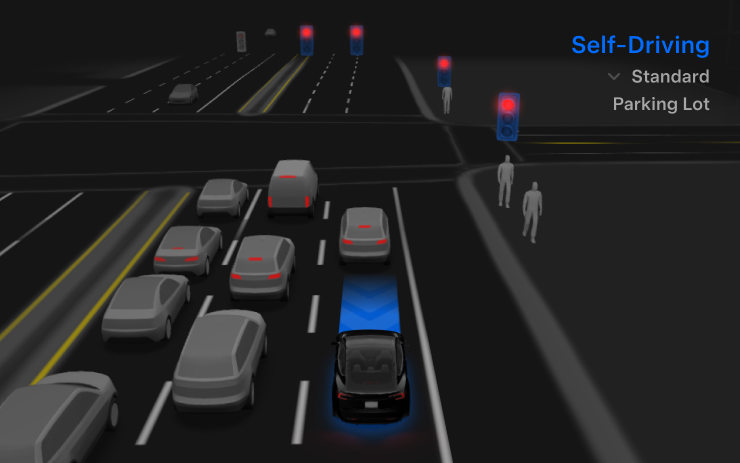
Autopilot Naming Update
This update changes certain feature names and on-screen text only; functionality remains the same.
- Navigate on Autopilot has been renamed to Navigate on Autosteer.
- FSD Computer has been renamed to AI Computer.
FSD (Supervised) v14.2.2.5

Full Self-Driving (Supervised) v14.2.2.4 includes:
- Upgraded the neural network vision encoder, leveraging higher resolution features to further improve scenarios like handling emergency vehicles, obstacles on the road, and human gestures. (New in FSD V14.2)
- Added Arrival Options for you to select where FSD should park: in a Parking Lot, on the Street, in a Driveway, in a Parking Garage, or at the Curbside.
- Added handling to pull over or yield for emergency vehicles (e.g. police cars, fire trucks, ambulances).
- Added navigation and routing into the vision-based neural network for real-time handling of blocked roads and detours.
- Added additional Speed Profile to further customize driving style preference.
- Improved handling for static and dynamic gates.
- Improved offsetting for road debris (e.g. tires, tree branches, boxes).
- Improve handling of several scenarios including: unprotected turns, lane changes, vehicle cut-ins, and school busses.
- Improved FSD's ability to manage system faults and recover smoothly from degraded operation for enhanced reliability.
- Added alerting for residue build-up on interior windshield that may impact front camera visibility. If affected, visit Service for cleaning!
- Added automatic narrow field washing to provide rapid and efficient front camera self-cleaning, and optimize aerodynamics wash at higher vehicle speed. (2026+ Model Y only)
- Camera visibility can lead to increased attention monitoring sensitivity. (New in FSD v14.2.1)
Upcoming Improvements
- Overall smoothness and sentience.
- Parking spot selection and parking quality.
Arrival Options

- You can now select an arrival option such as Parking Lot, Street, Driveway, Parking Garage and Curbside for Robotaxi-style drop offs.
- Your preferences for arrival options and preferred parking positions are persisted for each destination.
- The reasoning model will assess the suitable options for your destination and pick an intuitive default.
- The navigation pin will be adjusted based on the selected Arrival Option. (Added to release notes in FSD v14.2.2)
Speed Profiles

FSD (Supervised) will now determine the appropriate speed based on a mix of driver profile, speed limit, and surrounding traffic.
- Introduced new Speed Profile SLOTH, which comes with lower speeds & more conservative lane selection than CHILL.
- Introduced new speed profile MAD MAX, which comes with higher speeds and more frequent lane changes than HURRY.
- Driver profile now has a stronger impact on behavior. The more assertive the profile, the higher the max speed.
- Right scroll-wheel up/down now adjusts Speed Profile setting rather than your precise max speed offset selection in mph/kph.
UI Improvements

- You can now view your Self-Driving stats under Controls > Autopilot. (Added to release notes in FSD v14.2.2)
- Start Self-Driving with a tap of the touchscreen from Park, or any time during your drive.
- Adjust settings like the Speed Profile and Arrival Options directly from the Autopilot visualization on the center display.
Brake Confirm
Brake Confirm for the Start Self-Driving button is now defaulted off. When disabled, Start Self-Driving will not require you to press and release the brake to confirm engagement.
You can enable Brake Confirm in Autopilot > Brake Confirm.
Full Self-Driving (Supervised)

Under your supervision, Full Self-Driving (Supervised) can drive your Tesla almost anywhere. It will start from a parked position, make lane changes, select forks to follow your navigation route, navigate around other vehicles and objects, make left and right turns and park at your destination. You and anyone you authorize must use additional caution and remain attentive. It does not make your vehicle autonomous. Do not become complacent.
Full Self-Driving (Supervised) is enabled on your vehicle. To use the feature, press the Start Self-Driving button on the UI, or press the right scroll wheel button once. You can disable Full Self-Driving (Supervised) in Autopilot Settings.
Grok with Navigation Commands (Beta)
You can now talk to Grok, an intelligent assistant built by xAI. You can choose Grok's voice and personality, ranging from Storyteller to Unhinged.
Grok can add and edit navigation destinations, becoming your personal guide. You can ask Grok to navigate to the best Thai restaurant near you, find a Supercharger within walking distance of a coffee shop, or even plan a romantic sightseeing tour. Requires Premium Connectivity or a WiFi connection. Conversations are anonymous to Tesla and not associated with your vehicle.
To launch Grok, go to App Launcher > Grok, or long-press the voice button on your steering wheel after you have logged in to Grok. Set Grok's personality to Assistant to use Navigation Commands.
Note: Grok is currently in early Beta and does not support voice commands for car controls other than navigation. Existing voice commands remain unchanged.
Editorial note: Grok is launching in parts of Europe with this update.
Unlatching Charge Cable
Charging can now be stopped and the charge cable released by pulling and holding the rear left door handle for 3 seconds, provided the vehicle is unlocked or a recognized key is nearby. This is especially useful when the charge cable doesn’t have an unlatch button. You can still release the cable using the vehicle touchscreen or the Tesla app.
Child Left Alone Detection
If an unattended child is detected, the vehicle will flash the exterior indicator lights, play an alert tone, and send a notification to your Tesla app. This will repeat at regular intervals until you return to your vehicle. Cabin data is processed locally and is not transmitted to Tesla.
This feature is enabled by default. To disable, go to Controls > Safety > Child Left Alone Detection.
Minor Fixes

This release contains minor bug fixes and improvements.
Maps Version
Tesla has changed the way the map version appears in the Software menu. Instead of listing the full map version, which includes the region, version, and build, Tesla will now include only the region and version, such as NA-2025.44.
Supercharger Site Maps Expanded
Tesla added 3D Supercharger Site maps in the 2025 Holiday Update. While the holiday update included 18 Supercharger sites in the United States, Tesla is now expanding this to Europe. We found at least two new Supercharger site maps in Belgium, located in Brugge and Heusden-Zolder.
These 3D representations of a Supercharger site include an accurate layout of the site, which is then coupled with live data.
The layout shows where each spot is, the location of the charger relative to the parking spot, handicap- and trailer-friendly stalls, and more.
The live data is even more interesting. Not only does it show which spots are occupied, but it also shows which Tesla model is charging at each location. It’ll identify and display a 3D model of the vehicle, and for non-Tesla EVs, it’ll display a generic vehicle model.
While these 3D models are limited to vehicles with AMD Ryzen infotainment units, anyone can view them by searching for the location in maps.
Service Mode Improvements
ECU Update Status Panel Updates - Non-CAN ECUs Added
The ECU Update Status panel now includes non-Controller Area Network (CAN) Electronic Control Units (ECUs), such as the Autopilot processors and Telematics Control Unit (TCU).
Models: Model S (2021+), Model 3, Model X (2021+), Model Y, Cybertruck
















Share:
Tesla Removes 'Autopilot' Name in New Software Update
Tesla Giga Berlin Head Slams Media for 'False' Union Claims